cancel
Showing results for 
Search instead for 
Did you mean: 

The Power BI Data Visualization World Championships is back! Get ahead of the game and start preparing now! Learn more

Reply
Amardeep100115
Post Prodigy
Post Prodigy

Conditional Formatting

Hi 


I have  calender where lease expiration data is maintained, 


i would like to be have a results like if i select Month/Unique as in filter/dropdown the data should be reflact for that month and the the not month/Unique option selected then the calender visual suposed to be reflact currant month data for lease expiration and count of site. Also according to lease end dates the day of lease expiring should be have conditionaly formatted RED, AMBER, GREEN, for expiring soon please refer remaining days and apply conditional formating accordingly


Sample BI File 


Thank you!


Amardeep Bhingardeve
1 REPLY 1
v-kelly-msft
Community Support
Community Support

Hi @Amardeep100115 ,


I'm a little confused about your request,can you advise me your expected output?RED, AMBER, GREEN, is for what kinds of period?

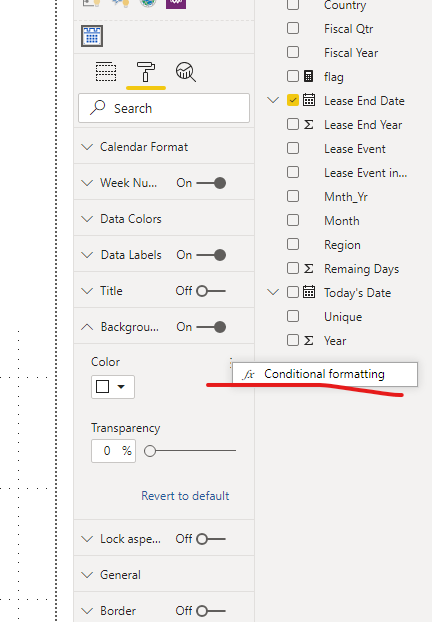
As for simply conditional fomatting,you can turn to the reference here :

 https://docs.microsoft.com/en-us/power-bi/desktop-conditional-table-formatting

In your visual,just click here:

Annotation 2020-02-10 155058.png


Best Regards,
Kelly


Helpful resources

Announcements
Power BI DataViz World Championships

Power BI Dataviz World Championships

The Power BI Data Visualization World Championships is back! Get ahead of the game and start preparing now!

December 2025 Power BI Update Carousel

Power BI Monthly Update - December 2025

Check out the December 2025 Power BI Holiday Recap!

FabCon Atlanta 2026 carousel

FabCon Atlanta 2026

Join us at FabCon Atlanta, March 16-20, for the ultimate Fabric, Power BI, AI and SQL community-led event. Save $200 with code FABCOMM.