
Join us at FabCon Atlanta from March 16 - 20, 2026, for the ultimate Fabric, Power BI, AI and SQL community-led event. Save $200 with code FABCOMM.
Register now!The Power BI Data Visualization World Championships is back! Get ahead of the game and start preparing now! Learn more
I have copied the matrix table from one report to another, then changed the source BUT the conditional Formatting is not working correctly
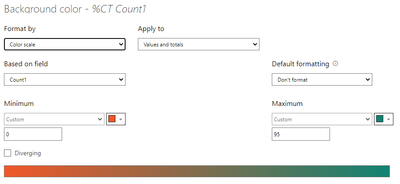
Required Greater Than 95% colour should be Green, less than 95% should be red (although Power BI does not do red very well)
First Matrix (New month February) does not continue Formatting
The second Matrix is wrong completely
Conditional Formating
Solved! Go to Solution.
Hi @Anonymous ,
Try defining your conditional formatting on a scale of 0 to 1 like Minimun=0, Maximum=0.95
Check if this works.
Thanks,
Pragati
Hi @Anonymous ,
Try defining your conditional formatting on a scale of 0 to 1 like Minimun=0, Maximum=0.95
Check if this works.
Thanks,
Pragati
Thanks for such a quick answer 0.95 did not work, gave the wrong results completly
BUT
9.5 as the higher works like a treat, thank you so much for the guidance and putting me on the right track
Hi @Anonymous ,
This could be due to the data formatting of your percentage field. But nice that you found the solution.
Thanks,
Pragati
How do I check the data formatting of the percentage field?
The Power BI Data Visualization World Championships is back! Get ahead of the game and start preparing now!
| User | Count |
|---|---|
| 40 | |
| 35 | |
| 34 | |
| 31 | |
| 28 |
| User | Count |
|---|---|
| 136 | |
| 102 | |
| 68 | |
| 66 | |
| 58 |