Join us at FabCon Atlanta from March 16 - 20, 2026, for the ultimate Fabric, Power BI, AI and SQL community-led event. Save $200 with code FABCOMM.
Register now!The Power BI Data Visualization World Championships is back! Get ahead of the game and start preparing now! Learn more
Hello,
I am at a blank today. Apologies.
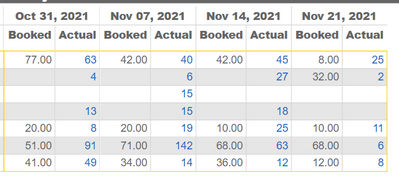
I have this report and on it are employees booked hours and their actual hours for the past 4 weeks.
Instead of the blue font in Actual Hours, I want the font to vary by color bsed on the booked hours data.
For Example:
Red font when the actual hours exceeds the booked hours
Orange font when there are actual hours and no booked hours
Blue font for when the actual hours is less than the corresponting booked hours.
I have tried this in conditional formatting, but it keeps pushing me back to gradient.
Sorry if there is an easy answer to this and I wasted your time.
Hi @Anonymous
There are a couple of ways to do this with a measure that you can you use with conditional formatting as a field value.
You could use color names in a measure
Color =
IF (
ISBLANK ( SUM ( table[Booked] ) ),
"Orange",
IF ( SUM ( table[Booked] ) > SUM ( table[Actual] ), "Red", "Blue" )
)As an alternative to the color names you could also use HEX, RGBA, HSLA codes.
For example
"Red"
"hsla(0, 100%, 50%, 0%)"
"rgba(255,0,0,1)"
"#FF0000"
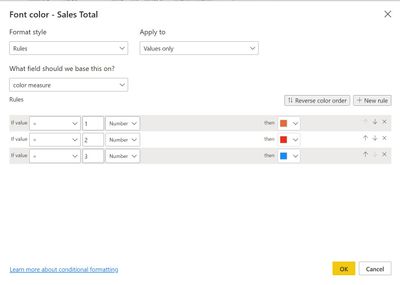
As a third option you could use the measure to generate numbers ( 1, 2, 3) an then use the measure as a rule to create conditional formatting and the manually attach colors to the result of the measure.
Best regards,
Jeroen Dekker
If this post helps, please consider accepting it as the solution to help the other members find it more quickly.
Appreciate your Kudos!!
Thank you, @jeroendekk. I appreciate your time taking a look at this.
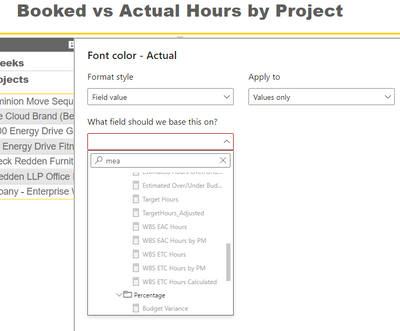
I created the measure, but now it is not letting me use a measure as a field to base it on.
@Anonymous
If it is greyed out, that is supposed to mean something is wrong with the measure and it does not show an usuable color or color code.
Can you share which measure you used?
Best regards,
Jeroen
The Power BI Data Visualization World Championships is back! Get ahead of the game and start preparing now!
| User | Count |
|---|---|
| 38 | |
| 36 | |
| 33 | |
| 30 | |
| 28 |
| User | Count |
|---|---|
| 128 | |
| 88 | |
| 79 | |
| 67 | |
| 62 |