cancel
Showing results for 
Search instead for 
Did you mean: 

The Power BI Data Visualization World Championships is back! Get ahead of the game and start preparing now! Learn more

Reply
yasirm
Frequent Visitor

Conditional Formatting per Row and Column

Hi,

I have the following schema for Data table

Start Date

End Date

Category
(Text)

SubCategory

(Text)

Comments

Month key
(Calculated Column)

Week Key
(Calculated Column)

7/22/2021

7/22/2021

Category1

Subcategory1


7

4


Month Key is calculated using the MONTH() function

Week Key equates any Start Date.Day greater than 21 to be 4


There are only three categories. I would like to implement a weekly calendar in the form of a table visual that conditionally formats the background color.


I need something like:

For Each Week
-if month contains only Category 1 then color 1 (and so on up to Category 3)

-if month contains more than one category then color 4


The end result looks like this

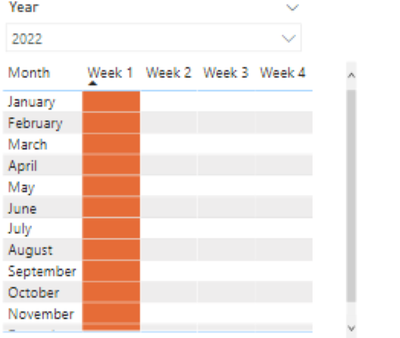
yasirm_0-1626913282937.png

The above image was created using an empty table which is related to the Data table via month key.
Thanks in advance, I am unable to find something related to this on the web.


1 ACCEPTED SOLUTION
ebeery
Memorable Member
Memorable Member

@yasirm I would approach this by creating a measure which returns the hex code of the desired color, based on the values of "Category" in the current cell context (Month, Week).

Here's an example of what that format like look like:

ConditionalFormatMeasure = 
SWITCH(
    TRUE(),
    SELECTEDVALUE('DataTable'[Category]) = "Category1", "#d7191c",
    SELECTEDVALUE('DataTable'[Category]) = "Category2", "#fdae61",
    SELECTEDVALUE('DataTable'[Category]) = "Category3","#abd9e9",
    DISTINCTCOUNT('DataTable'[Category]) > 1, "#2c7bb6"
)

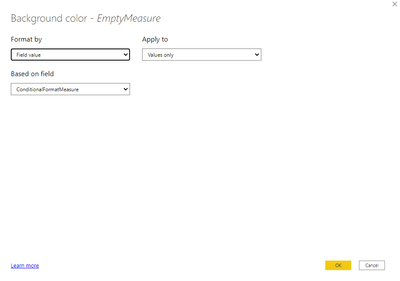
After creating the measure you can use it to conditionally format the background color of the matrix values by using the "Format By: Field value" option.

Note you will need to add some measure/field to the "Values" of the Matrix to apply this formatting to - in my case I created an EmptyMeasure (EmptyMeasure = "").

ebeery_0-1626925932407.png


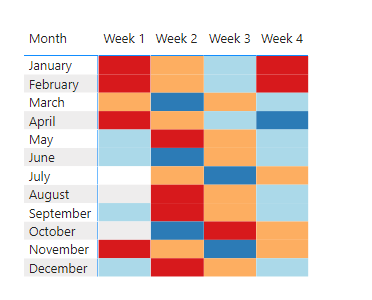
Below is an example of the result:

ebeery_1-1626926028913.png


View solution in original post

2 REPLIES 2
ebeery
Memorable Member
Memorable Member

@yasirm I would approach this by creating a measure which returns the hex code of the desired color, based on the values of "Category" in the current cell context (Month, Week).

Here's an example of what that format like look like:

ConditionalFormatMeasure = 
SWITCH(
    TRUE(),
    SELECTEDVALUE('DataTable'[Category]) = "Category1", "#d7191c",
    SELECTEDVALUE('DataTable'[Category]) = "Category2", "#fdae61",
    SELECTEDVALUE('DataTable'[Category]) = "Category3","#abd9e9",
    DISTINCTCOUNT('DataTable'[Category]) > 1, "#2c7bb6"
)

After creating the measure you can use it to conditionally format the background color of the matrix values by using the "Format By: Field value" option.

Note you will need to add some measure/field to the "Values" of the Matrix to apply this formatting to - in my case I created an EmptyMeasure (EmptyMeasure = "").

ebeery_0-1626925932407.png


Below is an example of the result:

ebeery_1-1626926028913.png


amitchandak
Super User
Super User

@yasirm , Create a color measure like this and use in conditional formatting using field value option


Var _cat =calculate(distinctcount(Table[Category]), filter(all(Date), Date[Month] = max(Date[Month])))
return
Switch(_cat ,
1, "Green",
2, "blue",
3, "yellow",
"red"
)

Share with Power BI Enthusiasts: Full Power BI Video (20 Hours) YouTube
Microsoft Fabric Series 60+ Videos YouTube
Microsoft Fabric Hindi End to End YouTube

Helpful resources

Announcements
Power BI DataViz World Championships

Power BI Dataviz World Championships

The Power BI Data Visualization World Championships is back! Get ahead of the game and start preparing now!

December 2025 Power BI Update Carousel

Power BI Monthly Update - December 2025

Check out the December 2025 Power BI Holiday Recap!

FabCon Atlanta 2026 carousel

FabCon Atlanta 2026

Join us at FabCon Atlanta, March 16-20, for the ultimate Fabric, Power BI, AI and SQL community-led event. Save $200 with code FABCOMM.

Top Solution Authors