Get Fabric certified for FREE!
Don't miss your chance to take the Fabric Data Engineer (DP-700) exam on us!
Learn more- Power BI forums
- Get Help with Power BI
- Desktop
- Service
- Report Server
- Power Query
- Mobile Apps
- Developer
- DAX Commands and Tips
- Custom Visuals Development Discussion
- Health and Life Sciences
- Power BI Spanish forums
- Translated Spanish Desktop
- Training and Consulting
- Instructor Led Training
- Dashboard in a Day for Women, by Women
- Galleries
- Data Stories Gallery
- Themes Gallery
- Contests Gallery
- QuickViz Gallery
- Quick Measures Gallery
- Visual Calculations Gallery
- Notebook Gallery
- Translytical Task Flow Gallery
- TMDL Gallery
- R Script Showcase
- Webinars and Video Gallery
- Ideas
- Custom Visuals Ideas (read-only)
- Issues
- Issues
- Events
- Upcoming Events
The FabCon + SQLCon recap series starts April 14th at 8am Pacific. If you’re tracking where AI is going inside Fabric, this first session is a can't miss. Register now
- Power BI forums
- Forums
- Get Help with Power BI
- Desktop
- Conditional Formatting on Blank Matrix Cells
- Subscribe to RSS Feed
- Mark Topic as New
- Mark Topic as Read
- Float this Topic for Current User
- Bookmark
- Subscribe
- Printer Friendly Page

- Mark as New
- Bookmark
- Subscribe
- Mute
- Subscribe to RSS Feed
- Permalink
- Report Inappropriate Content
Conditional Formatting on Blank Matrix Cells
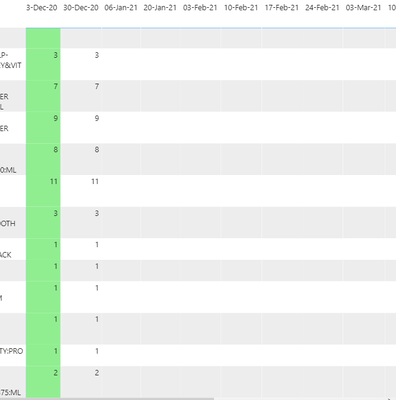
Hello, please help me out I am new to DAX! So, I am trying to apply conditional formatting to this sample table such that the blank cells are treated as zero, and also to remove the formatting from the first column. This is essentially weekly quantity of a different products, with products on x axis and weeks on y axis. The idea is to highlight the cell if the value is more (green) or less (pink) than the previous week. I created this measure and applied as field value in conditional formatting.


- Mark as New
- Bookmark
- Subscribe
- Mute
- Subscribe to RSS Feed
- Permalink
- Report Inappropriate Content
Hi, @Anonymous
There are several ways of conditional format, which can be used flexibly according to needs. Can you share some sample fake data or more information about the value? Is the value SUM(Append1[PDQ] )? Is it a column or a measure?
I want to help you but i'm a little confused.

Reference:
Conditional table formatting in Power BI Desktop - Power BI | Microsoft Docs
If you still need help, please feel free to ask me.
Best Regards
Janey Guo
If this post helps, then please consider Accept it as the solution to help the other members find it more quickly.
- Mark as New
- Bookmark
- Subscribe
- Mute
- Subscribe to RSS Feed
- Permalink
- Report Inappropriate Content
Hi @v-janeyg-msft , thanks so much for your response! Can I send you a sample pbix file in message? If you can send me a message I can reply to it with that for some reason am unable to send one myself.
- Mark as New
- Bookmark
- Subscribe
- Mute
- Subscribe to RSS Feed
- Permalink
- Report Inappropriate Content
Hi, @Anonymous
I'm sorry. Due to the nature of work, our communication is limited to post replies.
You need to give me the structure of the data you use in the matrix, the code of the value and your final results like , You can also send it in the form of pictures and forms and attention to erase private information. I will try my best to help you. Of course, if you can send out a sample file, it might be faster.
Best Regards
Janey Guo
- Mark as New
- Bookmark
- Subscribe
- Mute
- Subscribe to RSS Feed
- Permalink
- Report Inappropriate Content
@v-janeyg-msft Its not letting me post for some reason. I am getting an error that post flooding detected.
- Mark as New
- Bookmark
- Subscribe
- Mute
- Subscribe to RSS Feed
- Permalink
- Report Inappropriate Content
Hi, @Anonymous
If there's a problem, You can also share your sample data information through these methods.
Although it's a bit troublesome, it's hard to solve your problem at once if you don't provide specific information(I asked you before).
Best Regards
Janey Guo


- Mark as New
- Bookmark
- Subscribe
- Mute
- Subscribe to RSS Feed
- Permalink
- Report Inappropriate Content
@Anonymous , Based on what I got. Try a measure like
format =
SWITCH (
TRUE (),
isblank(SUM(Append1[PDQ] )) && isblank((SUM(Append1[PDQ] ),DATEADD(Append1[MinDate],-7,DAY))) ,"red",
SUM(Append1[PDQ] )< CALCULATE (SUM(Append1[PDQ] ),DATEADD(Append1[MinDate],-7,DAY)), "pink",
SUM(Append1[PDQ] )> CALCULATE (SUM(Append1[PDQ] ),DATEADD(Append1[MinDate],-7,DAY)),"lightgreen")
- Mark as New
- Bookmark
- Subscribe
- Mute
- Subscribe to RSS Feed
- Permalink
- Report Inappropriate Content
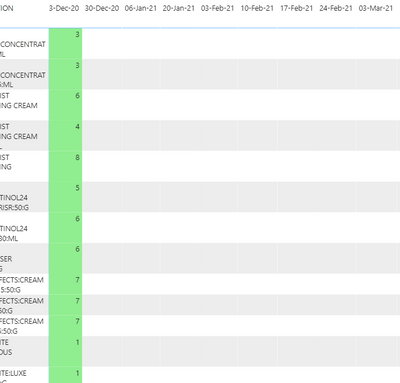
Thank you for your prompt response! I tried this but its not working (I think you meant to add CALCULATE as well so I edited that in):
- Mark as New
- Bookmark
- Subscribe
- Mute
- Subscribe to RSS Feed
- Permalink
- Report Inappropriate Content
@Anonymous , ok got, if the value is blank, conditional formatting will not work
change you measure with +0 (which you have used on values and then add condition for that [measure]=0 in the color
Asumme you are displaying SUM(Append1[PDQ])
use measure 1 =SUM(Append1[PDQ])+0
SWITCH (
TRUE (),
[measure 1 ]=0 "red",
SUM(Append1[PDQ] )< CALCULATE (SUM(Append1[PDQ] ),DATEADD(Append1[MinDate],-7,DAY)), "pink",
SUM(Append1[PDQ] )> CALCULATE (SUM(Append1[PDQ] ),DATEADD(Append1[MinDate],-7,DAY)),"lightgreen")
- Mark as New
- Bookmark
- Subscribe
- Mute
- Subscribe to RSS Feed
- Permalink
- Report Inappropriate Content
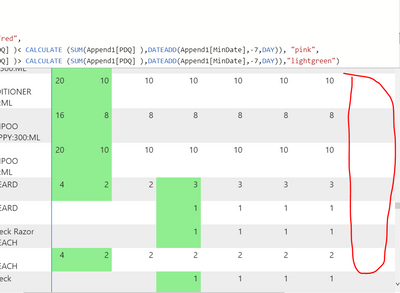
Its still not working unfortunately. for example I need this column to be highlighted red. So the first blank after a value:
Also is there anyway to remove the conditional formatting from the first week?
Helpful resources

New to Fabric Survey
If you have recently started exploring Fabric, we'd love to hear how it's going. Your feedback can help with product improvements.

Power BI DataViz World Championships - June 2026
A new Power BI DataViz World Championship is coming this June! Don't miss out on submitting your entry.

Join our Fabric User Panel
Share feedback directly with Fabric product managers, participate in targeted research studies and influence the Fabric roadmap.

Power BI Community Update - March 2026
Check out the March 2026 Power BI update to learn about new features.

| User | Count |
|---|---|
| 53 | |
| 40 | |
| 38 | |
| 19 | |
| 18 |


| User | Count |
|---|---|
| 70 | |
| 69 | |
| 34 | |
| 33 | |
| 30 |


