FabCon is coming to Atlanta
Join us at FabCon Atlanta from March 16 - 20, 2026, for the ultimate Fabric, Power BI, AI and SQL community-led event. Save $200 with code FABCOMM.
Register now!- Power BI forums
- Get Help with Power BI
- Desktop
- Service
- Report Server
- Power Query
- Mobile Apps
- Developer
- DAX Commands and Tips
- Custom Visuals Development Discussion
- Health and Life Sciences
- Power BI Spanish forums
- Translated Spanish Desktop
- Training and Consulting
- Instructor Led Training
- Dashboard in a Day for Women, by Women
- Galleries
- Data Stories Gallery
- Themes Gallery
- Contests Gallery
- QuickViz Gallery
- Quick Measures Gallery
- Visual Calculations Gallery
- Notebook Gallery
- Translytical Task Flow Gallery
- TMDL Gallery
- R Script Showcase
- Webinars and Video Gallery
- Ideas
- Custom Visuals Ideas (read-only)
- Issues
- Issues
- Events
- Upcoming Events
The Power BI Data Visualization World Championships is back! Get ahead of the game and start preparing now! Learn more
- Power BI forums
- Forums
- Get Help with Power BI
- Desktop
- Conditional Formatting in matrix based on custom f...
- Subscribe to RSS Feed
- Mark Topic as New
- Mark Topic as Read
- Float this Topic for Current User
- Bookmark
- Subscribe
- Printer Friendly Page


- Mark as New
- Bookmark
- Subscribe
- Mute
- Subscribe to RSS Feed
- Permalink
- Report Inappropriate Content
Conditional Formatting in matrix based on custom fiscal quarter
Hi
I could really do with some help understanding conditional formatting, specifically when using customer fiscal quarters. Our financial year runs form April 1st to Mar 31st so Q1 is Apr-Jun, Q2 Jul-Sep etc. I have created a date calendar with these fiscal quarters.
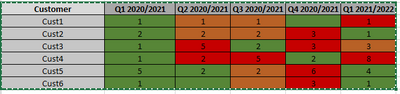
I have created a simple matrix which counts the number of customer orders per customer per quarter. I would like to use conditional formatting using a simple RAG system to show the change each quarter as per the Excel example below. I can't work out how to do this!
Any help would be very much appreciated!
Thank you
Solved! Go to Solution.


- Mark as New
- Bookmark
- Subscribe
- Mute
- Subscribe to RSS Feed
- Permalink
- Report Inappropriate Content
@WBscooby , have measures like
QTD Sales = CALCULATE(SUM(Sales[Sales Amount]),DATESQTD(('Date'[Date])))
Last QTD Sales = CALCULATE(SUM(Sales[Sales Amount]),DATESQTD(dateadd('Date'[Date],-1,QUARTER)))
or
This Qtr = CALCULATE(sum('Table'[Qty]), FILTER(ALL('Date'),'Date'[Qtr Rank]=max('Date'[Qtr Rank])))
Last Qtr = CALCULATE(sum('Table'[Qty]), FILTER(ALL('Date'),'Date'[Qtr Rank]=max('Date'[Qtr Rank])-1))
if([This Qtr] >[Last Qtr], "Green", "Red" )
Use in conditional formatting using field value option
- Mark as New
- Bookmark
- Subscribe
- Mute
- Subscribe to RSS Feed
- Permalink
- Report Inappropriate Content
@WBscooby , what is issue, Qtr no? or use of Qtr in conditional
You can create a color measure where you use both measure and dimension value
examples
Color sales = if(AVERAGE(Sales[Sales Amount])<170,"green","red")
Color Year = if(FIRSTNONBLANK('Table'[Year],2014) <=2016,"lightgreen",if(FIRSTNONBLANK('Table'[Year],2014)>2018,"red","yellow"))
Color = if(FIRSTNONBLANK('Table'[Year],2014) <=2016 && AVERAGE(Sales[Sales Amount])<170
,"lightgreen",if(FIRSTNONBLANK('Table'[Year],2014)>2018,"red","yellow"))
Color sales = if([Sales Today] -[sales yesterday]>0,"green","red")
color =
switch ( true(),
FIRSTNONBLANK('Table'[commodity],"NA") ="commodity1" && sum('Table'[Value]) >500,"lightgreen",
FIRSTNONBLANK('Table'[commodity],"NA") ="commodity2" && sum('Table'[Value]) >1000,"lightgreen",
// Add more conditions
"red"
)
switch(true() ,
max(Table[status]) = "Completed" , "Green",
max(Table[status]) = "Running" , "Grey"
max(Table[status]) = "Errored" , "Red"
)
How to do conditional formatting by measure and apply it on pie?: https://youtu.be/RqBb5eBf_I4
- Mark as New
- Bookmark
- Subscribe
- Mute
- Subscribe to RSS Feed
- Permalink
- Report Inappropriate Content
Hi
Thank you for replying. The problem i have is the Qtr - it is custom.
I am trying to use conditional formatting to show the change between quarters e.g.
If Qtr 2 is greater than Q1 then highlight green
If Qtr 2 is same as Qtr1 then highlight orange
etc
I know there is a previousquarter function but this won't work as my quarters are custom.
Hope this makes sense!
- Mark as New
- Bookmark
- Subscribe
- Mute
- Subscribe to RSS Feed
- Permalink
- Report Inappropriate Content
@WBscooby , have measures like
QTD Sales = CALCULATE(SUM(Sales[Sales Amount]),DATESQTD(('Date'[Date])))
Last QTD Sales = CALCULATE(SUM(Sales[Sales Amount]),DATESQTD(dateadd('Date'[Date],-1,QUARTER)))
or
This Qtr = CALCULATE(sum('Table'[Qty]), FILTER(ALL('Date'),'Date'[Qtr Rank]=max('Date'[Qtr Rank])))
Last Qtr = CALCULATE(sum('Table'[Qty]), FILTER(ALL('Date'),'Date'[Qtr Rank]=max('Date'[Qtr Rank])-1))
if([This Qtr] >[Last Qtr], "Green", "Red" )
Use in conditional formatting using field value option
- Mark as New
- Bookmark
- Subscribe
- Mute
- Subscribe to RSS Feed
- Permalink
- Report Inappropriate Content
Hi
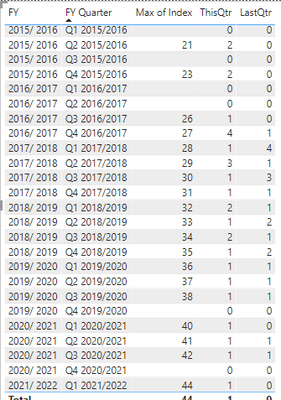
Sorry, I seem to be having one last problem - where there is no data for the quarter, the max does not seem to be calculating correctly. The Dax I have used is as follows:
- Mark as New
- Bookmark
- Subscribe
- Mute
- Subscribe to RSS Feed
- Permalink
- Report Inappropriate Content
Thank you!
I used the formula below (amended slightly for my data) and it worked brilliantly!!
This Qtr = CALCULATE(sum('Table'[Qty]), FILTER(ALL('Date'),'Date'[Qtr Rank]=max('Date'[Qtr Rank])))
Last Qtr = CALCULATE(sum('Table'[Qty]), FILTER(ALL('Date'),'Date'[Qtr Rank]=max('Date'[Qtr Rank])-1))
if([This Qtr] >[Last Qtr], "Green", "Red" )

Helpful resources

Power BI Monthly Update - November 2025
Check out the November 2025 Power BI update to learn about new features.

Fabric Data Days
Advance your Data & AI career with 50 days of live learning, contests, hands-on challenges, study groups & certifications and more!

FabCon Atlanta 2026
Join us at FabCon Atlanta, March 16-20, for the ultimate Fabric, Power BI, AI and SQL community-led event. Save $200 with code FABCOMM.


