cancel
Showing results for 
Search instead for 
Did you mean: 

Join the FabCon + SQLCon recap series. Up next: Power BI, Real-Time Intelligence, IQ and AI, and Data Factory take center stage. All sessions are available on-demand after the live show. Register now

Reply

Conditional Formatting for the customized %

HI All,


Can some one help me with the conditional formatting for the customized numbers.

There are 2 columns should be updated with different conditional Formatting.


mber formatting.jpg

1 ACCEPTED SOLUTION

Hi @RanjanThammaiah ,


If you use multi measure as the value, there is no need to create measure as color field (sorry for mislead you)


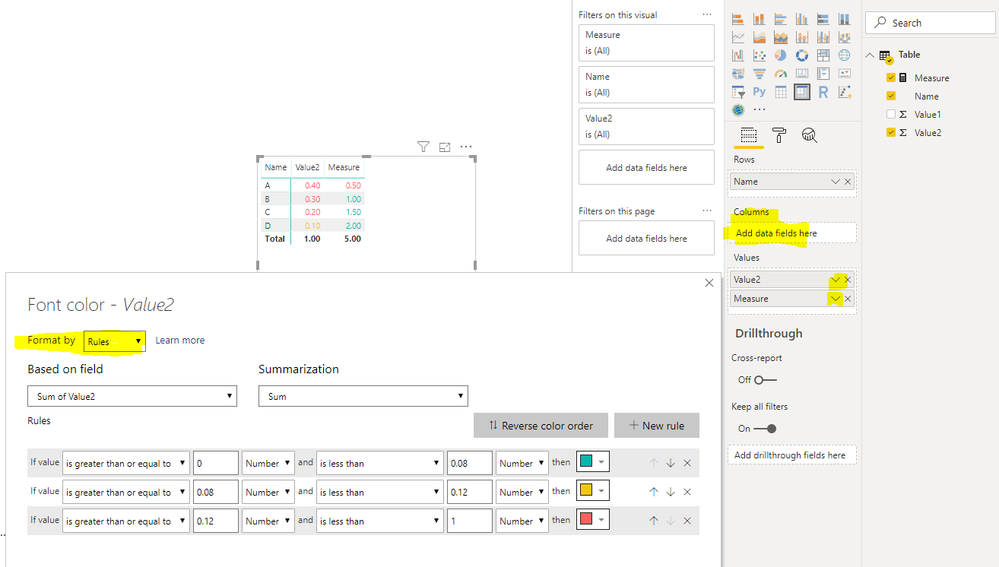
We can set color for each measure in the value field, Notice the "Based on field", select your measure.

19.PNG


BTW, pbix as attached.


Best regards,

Community Support Team _ Dong Li
If this post helps, then please consider Accept it as the solution to help the other members find it more quickly.

Community Support Team _ Dong Li
If this post helps, then please consider Accept it as the solution to help the other members find it more quickly.

View solution in original post

5 REPLIES 5
v-lid-msft
Community Support
Community Support

Hi @RanjanThammaiah ,


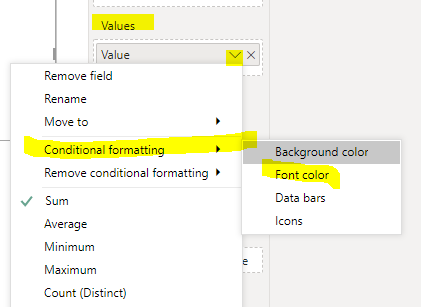
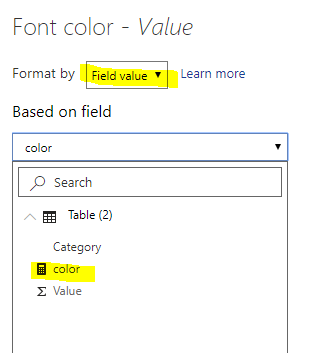
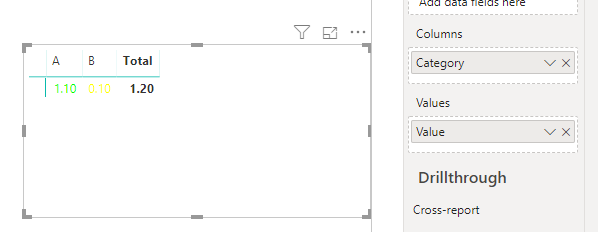
we can create a measure to define color, use the field value feature of matrix.


color = 
SWITCH (
    SELECTEDVALUE ( 'Table (2)'[Category] ),
    "A", SWITCH (
        TRUE (),
        SUM ( 'Table (2)'[Value] ) > 1, "#00FF00",
        SUM ( 'Table (2)'[Value] ) > 0.85, "#FFFF00",
        "#FF0000"), 
    "B", SWITCH (
        TRUE (),
        SUM ( 'Table (2)'[Value] ) < 0.08, "#00FF00",
        SUM ( 'Table (2)'[Value] ) <= 0.12, "#FFFF00",
        "#FF0000"
    )
)

8.5.PNG9.PNG10.PNG


If it doesn't meet your requirement, kindly share your sample data and expected result to me if you don't have any Confidential Information. Please upload your files to One Drive and share the link here.


BTW, pbix as attached.


Best regards,

Community Support Team _ Dong Li
If this post helps, then please consider Accept it as the solution to help the other members find it more quickly.

Community Support Team _ Dong Li
If this post helps, then please consider Accept it as the solution to help the other members find it more quickly.

Thanks for the response.

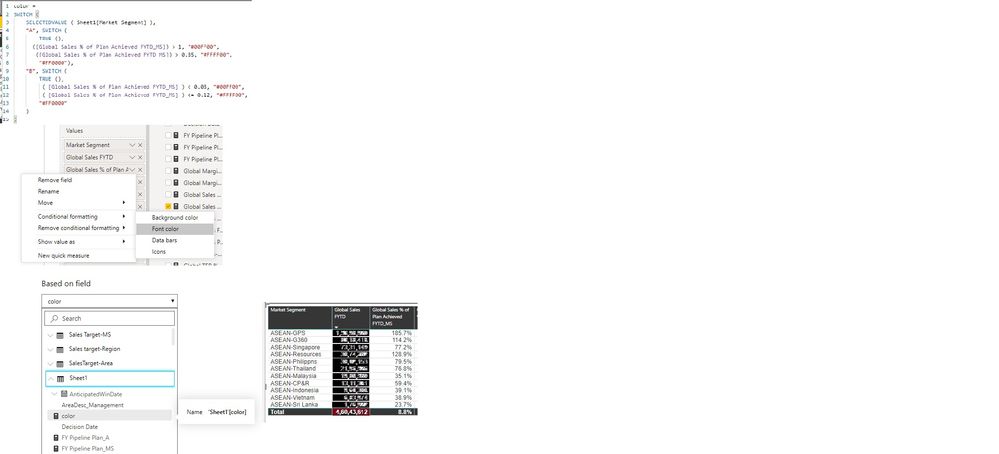
I have created hte same way you have explained. but seems to be its not working.

The column which i has the % value is the Calculated measure that i have created.

"Global Sales % of Plan Achieved FYTD_MS"


Conditional Formatting.jpg

Hi @RanjanThammaiah ,


If you use multi measure as the value, there is no need to create measure as color field (sorry for mislead you)


We can set color for each measure in the value field, Notice the "Based on field", select your measure.

19.PNG


BTW, pbix as attached.


Best regards,

Community Support Team _ Dong Li
If this post helps, then please consider Accept it as the solution to help the other members find it more quickly.

Community Support Team _ Dong Li
If this post helps, then please consider Accept it as the solution to help the other members find it more quickly.

thank you so much for your help. Much appreciated:)

parry2k
Super User
Super User

@RanjanThammaiah can you provide more details Read this post to get your answer quickly.

https://community.powerbi.com/t5/Community-Blog/How-to-Get-Your-Question-Answered-Quickly/ba-p/38490


Subscribe to the @PowerBIHowTo YT channel for an upcoming video on List and Record functions in Power Query!!

Learn Power BI and Fabric - subscribe to our YT channel - Click here: @PowerBIHowTo

If my solution proved useful, I'd be delighted to receive Kudos. When you put effort into asking a question, it's equally thoughtful to acknowledge and give Kudos to the individual who helped you solve the problem. It's a small gesture that shows appreciation and encouragement! ❤


Did I answer your question? Mark my post as a solution. Proud to be a Super User! Appreciate your Kudos 🙂
Feel free to email me with any of your BI needs.

Helpful resources

Announcements
April Power BI Update Carousel

Power BI Monthly Update - April 2026

Check out the April 2026 Power BI update to learn about new features.

New to Fabric survey Carousel

New to Fabric Survey

If you have recently started exploring Fabric, we'd love to hear how it's going. Your feedback can help with product improvements.

Power BI DataViz World Championships carousel

Power BI DataViz World Championships - June 2026

A new Power BI DataViz World Championship is coming this June! Don't miss out on submitting your entry.

FabCon and SQLCon Highlights Carousel

FabCon & SQLCon Highlights

Experience the highlights from FabCon & SQLCon, available live and on-demand starting April 14th.