cancel
Showing results for 
Search instead for 
Did you mean: 

The Power BI Data Visualization World Championships is back! Get ahead of the game and start preparing now! Learn more

Reply
Anonymous
Not applicable

Conditional Formatting by Rows in Matrix

Hello,


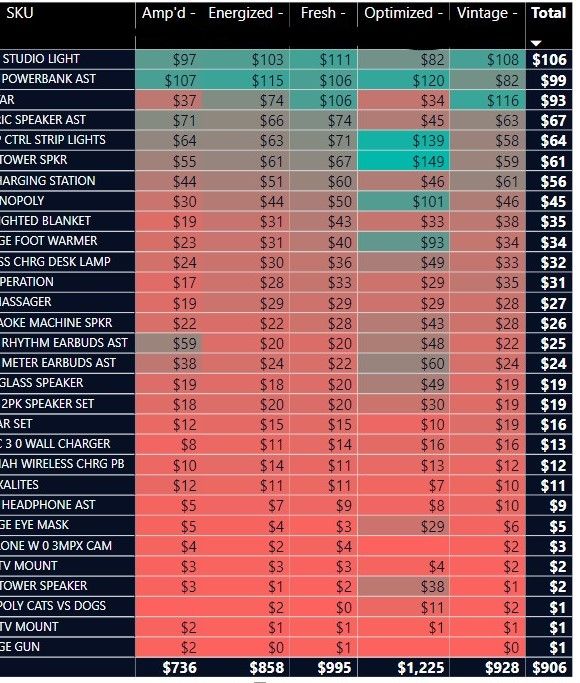
I am trying to do background conditional formatting on the rows fora measure I created in the values section of the below matrix. It is doing conditional formatting based on the columns. Is it possible to do conditional formatting across the rows instead of the columns?


Thank you


 SharedScreenshot.jpg

1 ACCEPTED SOLUTION
v-jingzhang
Community Support
Community Support

Hi @Anonymous 


I'm afraid this is not supported in a standard matrix visual currently. However here are some similar ideas you may vote for to help improve Power BI. Thanks a lot.

Microsoft Idea · Coloring the Matrix visual based on rows or columns (powerbi.com)

Microsoft Idea · Conditional Formatting for both text value and entire row in a table (powerbi.com)

Microsoft Idea · Conditional Formatting on selected rows and columns only. (powerbi.com)


Best Regards,
Community Support Team _ Jing Zhang
If this post helps, please consider Accept it as the solution to help other members find it.

View solution in original post

2 REPLIES 2
v-jingzhang
Community Support
Community Support

Hi @Anonymous 


I'm afraid this is not supported in a standard matrix visual currently. However here are some similar ideas you may vote for to help improve Power BI. Thanks a lot.

Microsoft Idea · Coloring the Matrix visual based on rows or columns (powerbi.com)

Microsoft Idea · Conditional Formatting for both text value and entire row in a table (powerbi.com)

Microsoft Idea · Conditional Formatting on selected rows and columns only. (powerbi.com)


Best Regards,
Community Support Team _ Jing Zhang
If this post helps, please consider Accept it as the solution to help other members find it.

amitchandak
Super User
Super User

@Anonymous , No, You can not format across row. You have to format all the columns.


If needed you can create a color measure and then use that for each value/column using field value in conditional formatting -

Color  = if(FIRSTNONBLANK('Table'[Year],2014) <=2016 && AVERAGE(Sales[Sales Amount])<170 
,"lightgreen",if(FIRSTNONBLANK('Table'[Year],2014)>2018,"red","yellow"))
Color sales = if([Sales Today] -[sales yesterday]>0,"green","red")

color =
switch ( true(),
FIRSTNONBLANK('Table'[commodity],"NA") ="commodity1" && sum('Table'[Value]) >500,"lightgreen",
FIRSTNONBLANK('Table'[commodity],"NA") ="commodity2" && sum('Table'[Value]) >1000,"lightgreen",
// Add more conditions
"red"
)


https://radacad.com/dax-and-conditional-formatting-better-together-find-the-biggest-and-smallest-numbers-in-the-column
https://docs.microsoft.com/en-us/power-bi/desktop-conditional-table-formatting#color-by-color-values

Share with Power BI Enthusiasts: Full Power BI Video (20 Hours) YouTube
Microsoft Fabric Series 60+ Videos YouTube
Microsoft Fabric Hindi End to End YouTube

Helpful resources

Announcements
Power BI DataViz World Championships

Power BI Dataviz World Championships

The Power BI Data Visualization World Championships is back! Get ahead of the game and start preparing now!

December 2025 Power BI Update Carousel

Power BI Monthly Update - December 2025

Check out the December 2025 Power BI Holiday Recap!

FabCon Atlanta 2026 carousel

FabCon Atlanta 2026

Join us at FabCon Atlanta, March 16-20, for the ultimate Fabric, Power BI, AI and SQL community-led event. Save $200 with code FABCOMM.