cancel
Showing results for 
Search instead for 
Did you mean: 

The Power BI Data Visualization World Championships is back! Get ahead of the game and start preparing now! Learn more

Reply
Anonymous
Not applicable

Conditional Formatting based on table

Hey everyone,

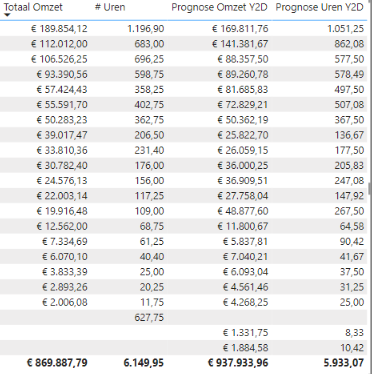
I've got the following table:

LaZZaNoVa61_0-1655737580598.png


I'd like to format the first two columns conditionally:
If the of Totaal Omzet is less then Prognose Omzet, then the value should be red. Otherwise green.

Is there a way to do this?

With kind regards,

Lazzanova

1 ACCEPTED SOLUTION
Saap
Resolver III
Resolver III

Hi @Anonymous 

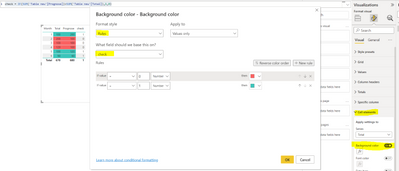
You can create simple measure to check if prognose is higher than total:


check = IF(SUM('Table new'[Prognose])>SUM('Table new'[Total]),1,0)
 
Then you go to matrix's visual settings, cell elements and apply background color based on your measure:
Saap_0-1655809287687.png


View solution in original post

1 REPLY 1
Saap
Resolver III
Resolver III

Hi @Anonymous 

You can create simple measure to check if prognose is higher than total:


check = IF(SUM('Table new'[Prognose])>SUM('Table new'[Total]),1,0)
 
Then you go to matrix's visual settings, cell elements and apply background color based on your measure:
Saap_0-1655809287687.png


Helpful resources

Announcements
Power BI DataViz World Championships

Power BI Dataviz World Championships

The Power BI Data Visualization World Championships is back! Get ahead of the game and start preparing now!

December 2025 Power BI Update Carousel

Power BI Monthly Update - December 2025

Check out the December 2025 Power BI Holiday Recap!

FabCon Atlanta 2026 carousel

FabCon Atlanta 2026

Join us at FabCon Atlanta, March 16-20, for the ultimate Fabric, Power BI, AI and SQL community-led event. Save $200 with code FABCOMM.