
cancel
Showing results for 
Search instead for 
Did you mean: 

We've captured the moments from FabCon & SQLCon that everyone is talking about, and we are bringing them to the community, live and on-demand. Starts on April 14th. Register now

Reply
Anonymous
Not applicable

Conditional Formatting based on Text

Hi, i have a "status rag" field that is either reg, amber or green.


I wish to have a card (or possibly table field?) that changes colour dependent on the value. I have tried 'cards with states' by OKviz, but this appears to only work with numeric values, as does conditional formatting in tables.


So have tried to create a measure that returns a numeric value,-


zzStatusToNumeric = 

Switch ( True(),

 'Projects (2)'[StatusRAG] = "Red","1" ) 


but have received an error:-


error.PNG


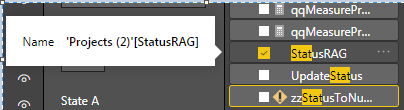
This is the field i am trying to reference:-


error2.PNG


Note thet there is a slicer on for 'project' so there is only one relevant row on the table. I think i need to limit the measure to FIRST (or similar) but am struggling...

1 ACCEPTED SOLUTION
v-lili6-msft
Community Support
Community Support

hi, @Anonymous 

First, you should know the difference between measure and column.
Notice:
1. Calculation column/table not support dynamic changed based on filter or slicer.
2. Measure can be affected by filter/slicer, so you can use it to get dynamic summary result.

A measure operates on aggregations of data defined by the current context
here is reference:
https://community.powerbi.com/t5/Desktop/Different-between-calculated-column-and-measure-Using-SUM/t...
https://www.sqlbi.com/articles/calculated-columns-and-measures-in-dax/

Second, for you requirement, you could try this way

Use SELECTEDVALUE in your formula, so adjust your measure like this:

zzStatusToNumeric = 

Switch ( True(),

SELECTEDVALUE( 'Projects (2)'[StatusRAG] )= "Red","1" ) 

or add a "zzStatusToNumeric column" then Conditional Formatting based it by the same logic.


Best Regards,
Lin

Community Support Team _ Lin
If this post helps, then please consider Accept it as the solution to help the other members find it more quickly.

View solution in original post

2 REPLIES 2
v-lili6-msft
Community Support
Community Support

hi, @Anonymous 

First, you should know the difference between measure and column.
Notice:
1. Calculation column/table not support dynamic changed based on filter or slicer.
2. Measure can be affected by filter/slicer, so you can use it to get dynamic summary result.

A measure operates on aggregations of data defined by the current context
here is reference:
https://community.powerbi.com/t5/Desktop/Different-between-calculated-column-and-measure-Using-SUM/t...
https://www.sqlbi.com/articles/calculated-columns-and-measures-in-dax/

Second, for you requirement, you could try this way

Use SELECTEDVALUE in your formula, so adjust your measure like this:

zzStatusToNumeric = 

Switch ( True(),

SELECTEDVALUE( 'Projects (2)'[StatusRAG] )= "Red","1" ) 

or add a "zzStatusToNumeric column" then Conditional Formatting based it by the same logic.


Best Regards,
Lin

Community Support Team _ Lin
If this post helps, then please consider Accept it as the solution to help the other members find it more quickly.
Anonymous
Not applicable

Thanks Lin. Apologies for the deay in replying but we decided to park this requriement, but we are now back trying to get this working.


A couple of questions. 

  • is the formula you gave for a measure or column?
  • You mention that "measure operates on aggregations of data". As the project table will be filtered to a single row by a slicer, do i need to aggregate as i am returning a single field in a row (the RAG of a project, the project table is 1 row per project)
  • I have created the following measure
     
    zzStatusRAGtoNumeric = 
    Switch ( True(),
    SELECTEDVALUE( 'Projects (2)'[StatusRAG] )= "Red","1" ,"Amber", "2", "Green" , "3")


  • I have then added a column to give a solid circle to conditionally format

  • zzStatusRAG_UNICHAR_Column = UNICHAR(11044)
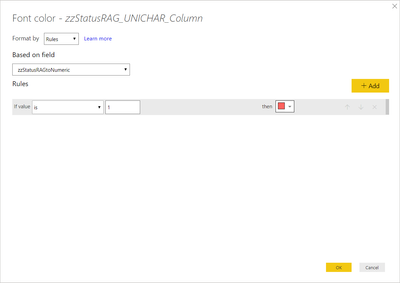
  • And attemptted to conditional format this column based on  zzStatusRAGtoNumeric Conditional Format.png
  • But get the following error:-
  • Feedback Type:
    Frown (Error)
    
    Timestamp:
    2019-07-30T09:28:35.0326414Z
    
    Local Time:
    2019-07-30T10:28:35.0326414+01:00
    
    Session ID:
    56322f8b-fde1-4de1-b539-95c572e00cf8
    
    Release:
    June 2019
    
    Product Version:
    2.70.5494.761 (19.06) (x64)
    
    Error Message:
    MdxScript(Model) (27, 70) Calculation error in measure 'Projects (2)'[zzStatusRAGtoNumeric]: Function 'SWITCH' does not support comparing values of type True/False with values of type Text. Consider using the VALUE or FORMAT function to convert one of the values.


    Any ideas what i am doing wrong? @v-lili6-msft 

Helpful resources

Announcements
New to Fabric survey Carousel

New to Fabric Survey

If you have recently started exploring Fabric, we'd love to hear how it's going. Your feedback can help with product improvements.

Power BI DataViz World Championships carousel

Power BI DataViz World Championships - June 2026

A new Power BI DataViz World Championship is coming this June! Don't miss out on submitting your entry.

Join our Fabric User Panel

Join our Fabric User Panel

Share feedback directly with Fabric product managers, participate in targeted research studies and influence the Fabric roadmap.

March Power BI Update Carousel

Power BI Community Update - March 2026

Check out the March 2026 Power BI update to learn about new features.