A new Data Days event is coming soon!
This time we’re going bigger than ever. Fabric, Power BI, SQL, AI and more. We're covering it all. You won't want to miss it.
Learn more- Power BI forums
- Get Help with Power BI
- Desktop
- Service
- Report Server
- Power Query
- Mobile Apps
- Developer
- DAX Commands and Tips
- Custom Visuals Development Discussion
- Health and Life Sciences
- Power BI Spanish forums
- Translated Spanish Desktop
- Training and Consulting
- Instructor Led Training
- Dashboard in a Day for Women, by Women
- Galleries
- Data Stories Gallery
- Themes Gallery
- Contests Gallery
- QuickViz Gallery
- Quick Measures Gallery
- Visual Calculations Gallery
- Notebook Gallery
- Translytical Task Flow Gallery
- TMDL Gallery
- R Script Showcase
- Webinars and Video Gallery
- Ideas
- Custom Visuals Ideas (read-only)
- Issues
- Issues
- Events
- Upcoming Events
Level up your Power BI skills this month - build one visual each week and tell better stories with data! Get started
- Power BI forums
- Forums
- Get Help with Power BI
- Desktop
- Conditional Formatting Table Dynamic
- Subscribe to RSS Feed
- Mark Topic as New
- Mark Topic as Read
- Float this Topic for Current User
- Bookmark
- Subscribe
- Printer Friendly Page

- Mark as New
- Bookmark
- Subscribe
- Mute
- Subscribe to RSS Feed
- Permalink
- Report Inappropriate Content
Conditional Formatting Table Dynamic
Hello,
So, i have this table which is a Scores table in this way:
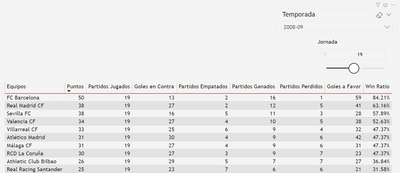
The order change with Season 'Temporada' and Time 'Jornada', so i need allways has this conditional format no matter what teams are in this places:
(This is ordered by Σ Total Points 'Puntos')
- The first 4 places rows must be in a color1
- The next 3 places rows must be in a color2
- The next 10 places rows must be in a color3
- The latest 3 places rows must be in a color4
Im trying to replicate this.
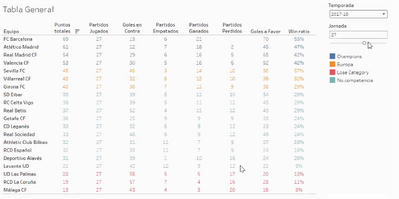
Thanks for your time, i really apretiatte this since is really important.
Regards.


- Mark as New
- Bookmark
- Subscribe
- Mute
- Subscribe to RSS Feed
- Permalink
- Report Inappropriate Content
Please refer if this can help
https://community.powerbi.com/t5/Desktop/Background-color-for-a-row-table-matrix/td-p/714419
Appreciate your Kudos. In case, this is the solution you are looking for, mark it as the Solution. In case it does not help, please provide additional information and mark me with @
Thanks.
My Recent Blog -
https://community.powerbi.com/t5/Community-Blog/HR-Analytics-Active-Employee-Hire-and-Termination-tr...
https://community.powerbi.com/t5/Community-Blog/Power-BI-Working-with-Non-Standard-Time-Periods/ba-p...
https://community.powerbi.com/t5/Community-Blog/Comparing-Data-Across-Date-Ranges/ba-p/823601
- Mark as New
- Bookmark
- Subscribe
- Mute
- Subscribe to RSS Feed
- Permalink
- Report Inappropriate Content
Hello, thanks for your answer.
Well, almost, this only works for the first row, but i need something based on the order position like:
COLOUR GLOBAL PROJECT ROW =

IF (HASONEVALUE(Projects[Project]) ,IF( FIRSTNONBLANK('Projects'[Project] , 0) ,"lightgreen" ,"white" ) ,BLANK() )

IF (HASONEVALUE(Projects[Project]) ,IF( SECONDNONBLANK('Projects'[Project] , 0) ,"lightblue" ,"white" ) ,BLANK() )

IF (HASONEVALUE(Projects[Project]) ,IF( THIRDNONBLANK('Projects'[Project] , 0) ,"lightyellow" ,"white" ) ,BLANK() )

And so on..
- Mark as New
- Bookmark
- Subscribe
- Mute
- Subscribe to RSS Feed
- Permalink
- Report Inappropriate Content
Can you create it based on Rank or some numeric column?
I tried on years like this
Color Year = if(FIRSTNONBLANK('Date'[Year],2014) <=2016,"lightgreen",if(FIRSTNONBLANK('Date'[Year],2014)>2018,"red","yellow"))
I tried it on font color. Also, it needs to be applied on all columns to get row colored
- Mark as New
- Bookmark
- Subscribe
- Mute
- Subscribe to RSS Feed
- Permalink
- Report Inappropriate Content
Again Amit, thanks.
The main problem is this is ordered by the total Score, which is a measure of the points by Season and the sum of the Time (Less than or equal to), so we can include several weeks in this total and diferent totals score by the selection.
What I know is that are going to be allways 20 rows.

- Mark as New
- Bookmark
- Subscribe
- Mute
- Subscribe to RSS Feed
- Permalink
- Report Inappropriate Content
@n4ch3 You need to add rank measure for you score and then use that to get the color and use that color measure in conditional formatting for all the columns in the matrix. for rank, read this post
Color =
SWITCH ( TRUE(),
[Rank] <= 4, "Blue",
[Rank] <= 7, "Yellow",
[Rank] <= 17, "Red",
"Green"
)
You can change above condition as per your business logic.
Subscribe to the @PowerBIHowTo YT channel for an upcoming video on List and Record functions in Power Query!!
Learn Power BI and Fabric - subscribe to our YT channel - Click here: @PowerBIHowTo
If my solution proved useful, I'd be delighted to receive Kudos. When you put effort into asking a question, it's equally thoughtful to acknowledge and give Kudos to the individual who helped you solve the problem. It's a small gesture that shows appreciation and encouragement! ❤
Did I answer your question? Mark my post as a solution. Proud to be a Super User! Appreciate your Kudos 🙂
Feel free to email me with any of your BI needs.
- Mark as New
- Bookmark
- Subscribe
- Mute
- Subscribe to RSS Feed
- Permalink
- Report Inappropriate Content
Hellop Parry, thanks for your answer.
That almost give what i'm looking for, please take a look:

But this rank give me some repeat numbers, its possible to include another column to make this unic, for example the Goals at favor 'Goles a Favor'?
This is what i'm using:
- Mark as New
- Bookmark
- Subscribe
- Mute
- Subscribe to RSS Feed
- Permalink
- Report Inappropriate Content
@n4ch3 in that blog post which I mentioned earlier there is a section talks about on how to break ties. Go thru that and that will help.
Subscribe to the @PowerBIHowTo YT channel for an upcoming video on List and Record functions in Power Query!!
Learn Power BI and Fabric - subscribe to our YT channel - Click here: @PowerBIHowTo
If my solution proved useful, I'd be delighted to receive Kudos. When you put effort into asking a question, it's equally thoughtful to acknowledge and give Kudos to the individual who helped you solve the problem. It's a small gesture that shows appreciation and encouragement! ❤
Did I answer your question? Mark my post as a solution. Proud to be a Super User! Appreciate your Kudos 🙂
Feel free to email me with any of your BI needs.

Helpful resources

Power BI Monthly Update - April 2026
Check out the April 2026 Power BI update to learn about new features.

Data Days 2026 coming soon!
Sign up to receive a private message when registration opens and key events begin.

New to Fabric Survey
If you have recently started exploring Fabric, we'd love to hear how it's going. Your feedback can help with product improvements.

Power BI DataViz World Championships - June 2026
A new Power BI DataViz World Championship is coming this June! Don't miss out on submitting your entry.

| User | Count |
|---|---|
| 36 | |
| 29 | |
| 29 | |
| 21 | |
| 18 |


| User | Count |
|---|---|
| 70 | |
| 40 | |
| 33 | |
| 24 | |
| 23 |


