cancel
Showing results for 
Search instead for 
Did you mean: 

The Power BI Data Visualization World Championships is back! Get ahead of the game and start preparing now! Learn more

Reply
PBI_Curve
Helper I
Helper I

Conditional Formatting - One Date's Values Based Another Date's Value

Hi Guys,


I'm creating a fairly basic table listing sales totals per salesperson, over time - as below. There are 3 fields: Date, Sales and Salesperson, that make up this table.


What I would like to do is colour code increases/decreases/no changes on the most recent date's total based off the previous date's total.


 01-Jan02-Jan
Tom £  800.00 £  700.00
Jane £  400.00 £  400.00
Mary £           -   £  150.00
John £  200.00 £  150.00
Luke £  650.00 £  800.00


So for example, the above would be [coloured] as below:


 01-Jan02-Jan
Tom £  800.00 £700.00 [RED] 
Jane £  400.00 £400.00 [YELLOW] 
Mary £           -   £150.00 [GREEN} 
John £  200.00 £150.00 [RED] 
Luke £  650.00 £800.00 [GREEN] 


I can only seem to apply conditional formatting to all values (i.e. both columns) on a general highest/lowest scale.


Is it possible to do what I'm looking for?


Cheers.

1 ACCEPTED SOLUTION
Anonymous
Not applicable

Hi @PBI_Curve,


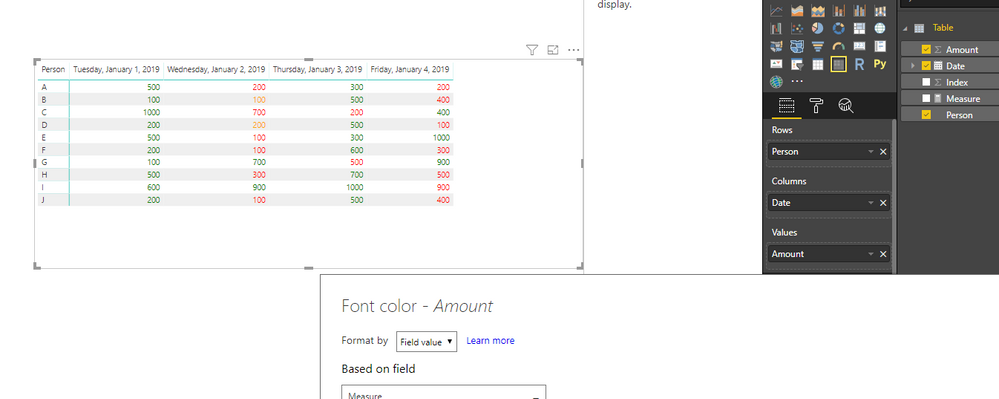
I'd like to suggest you write a measure to calculate the diff between date and return color string based on result, then you can simply use above measure as conditional format field of value column.

Measure = 
VAR currPerson =
    SELECTEDVALUE ( 'Table'[Person] )
VAR currDate =
    MAX ( 'Table'[Date] )
VAR prevDate =
    CALCULATE (
        MAX ( 'Table'[Date] ),
        FILTER ( ALLSELECTED ( 'Table' ), [Date] < currDate )
    )
VAR diff =
    LOOKUPVALUE (
        'Table'[Amount],
        'Table'[Person], currPerson,
        'Table'[Date], currDate
    )
        - LOOKUPVALUE (
            'Table'[Amount],
            'Table'[Person], currPerson,
            'Table'[Date], prevDate
        )
RETURN
    IF ( diff > 0, "Green", IF ( diff = 0, "Orange", "Red" ) )

13.png


Regards.

Xiaoxin Sheng

View solution in original post

2 REPLIES 2
Anonymous
Not applicable

Hi @PBI_Curve,


I'd like to suggest you write a measure to calculate the diff between date and return color string based on result, then you can simply use above measure as conditional format field of value column.

Measure = 
VAR currPerson =
    SELECTEDVALUE ( 'Table'[Person] )
VAR currDate =
    MAX ( 'Table'[Date] )
VAR prevDate =
    CALCULATE (
        MAX ( 'Table'[Date] ),
        FILTER ( ALLSELECTED ( 'Table' ), [Date] < currDate )
    )
VAR diff =
    LOOKUPVALUE (
        'Table'[Amount],
        'Table'[Person], currPerson,
        'Table'[Date], currDate
    )
        - LOOKUPVALUE (
            'Table'[Amount],
            'Table'[Person], currPerson,
            'Table'[Date], prevDate
        )
RETURN
    IF ( diff > 0, "Green", IF ( diff = 0, "Orange", "Red" ) )

13.png


Regards.

Xiaoxin Sheng

@Anonymous worked a charm.

Thanks!

Helpful resources

Announcements
Power BI DataViz World Championships

Power BI Dataviz World Championships

The Power BI Data Visualization World Championships is back! Get ahead of the game and start preparing now!

December 2025 Power BI Update Carousel

Power BI Monthly Update - December 2025

Check out the December 2025 Power BI Holiday Recap!

FabCon Atlanta 2026 carousel

FabCon Atlanta 2026

Join us at FabCon Atlanta, March 16-20, for the ultimate Fabric, Power BI, AI and SQL community-led event. Save $200 with code FABCOMM.