cancel
Showing results for 
Search instead for 
Did you mean: 

The Power BI Data Visualization World Championships is back! Get ahead of the game and start preparing now! Learn more

Reply
prasanna30
Regular Visitor

Conditional Formatting For Showcasing machine status


Hi,

We have requirement where we need to show  machine status with color coding in Direct Query mode in Power BI. For example If machine status is running  at  a particular time it should be shown in green color  and after  some time if machine status becomes faulted then it should be shown in red. The data is refreshed at interval of 5 minutes and machine status is changing  after 5 minutes. See below image for exact requirement

machinestatus.png

I wanted to have exact same color coding for different machine status. I have used Table HeatMap custom visuals from contnet store but the limitation of that is you can only have 1 color  range  and you can not assign different color for different status.


Please guide me how I can achieve this in Power BI . Any workaround will be highly appreciated.


Thanks in Advance.


Thanks,

Prasanna30

1 ACCEPTED SOLUTION
Eric_Zhang
Microsoft Employee
Microsoft Employee

@prasanna30

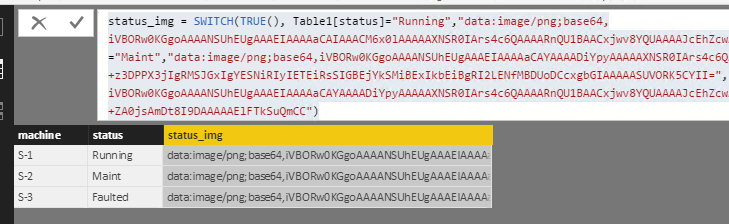
One workaround I can think of is to use the table visual showing status images.
Capture.PNG


status_img =
SWITCH (
    TRUE (),
    Table1[status] = "Running", "data:image/png;base64,iVBORw0KGgoAAAANSUhEUgAAAEIAAAAaCAIAAACM6x0lAAAAAXNSR0IArs4c6QAAAARnQU1BAACxjwv8YQUAAAAJcEhZcwAADsMAAA7DAcdvqGQAAAA6SURBVFhH7c8BCQAgEAAxs5jny35Daww5WIGdu/OBGpIakhqSGpIakhqSGpIakhqSGpIakhqSLxo7D0x+hDYkGySFAAAAAElFTkSuQmCC",
    Table1[status] = "Maint", "data:image/png;base64,iVBORw0KGgoAAAANSUhEUgAAAEIAAAAaCAYAAAADiYpyAAAAAXNSR0IArs4c6QAAAARnQU1BAACxjwv8YQUAAAAJcEhZcwAADsIAAA7CARUoSoAAAABOSURBVFhH7dBBDcAwEMCw6wCMP6Wi6qQqLGZ/8s86+z3DPPX3jIgRMSJGxIgYESNiRIyIETEiRsSIGBEjYkSMiBExIkbEiBgRI2LENfMBDUoDCcxgbGIAAAAASUVORK5CYII=",
    "data:image/png;base64,iVBORw0KGgoAAAANSUhEUgAAAEIAAAAaCAYAAAADiYpyAAAAAXNSR0IArs4c6QAAAARnQU1BAACxjwv8YQUAAAAJcEhZcwAADsIAAA7CARUoSoAAAABPSURBVFhH7dCxDYAwEMDAD3NQZv/NmIFIyFtw17j3eu79DnPV3zMiRsSIGBEjYkSMiBExIkbEiBgRI2JEjIgRMSJGxIgYESNiRIyIEZ+ZA0jsAmDt8I9DAAAAAElFTkSuQmCC"
)

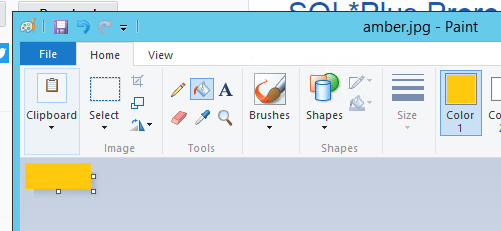
You can create the images in windows painter and convert them to base64 strings, see this link.
Capture.PNG


Capture.PNG

View solution in original post

1 REPLY 1
Eric_Zhang
Microsoft Employee
Microsoft Employee

@prasanna30

One workaround I can think of is to use the table visual showing status images.

Capture.PNG


status_img =
SWITCH (
    TRUE (),
    Table1[status] = "Running", "data:image/png;base64,iVBORw0KGgoAAAANSUhEUgAAAEIAAAAaCAIAAACM6x0lAAAAAXNSR0IArs4c6QAAAARnQU1BAACxjwv8YQUAAAAJcEhZcwAADsMAAA7DAcdvqGQAAAA6SURBVFhH7c8BCQAgEAAxs5jny35Daww5WIGdu/OBGpIakhqSGpIakhqSGpIakhqSGpIakhqSLxo7D0x+hDYkGySFAAAAAElFTkSuQmCC",
    Table1[status] = "Maint", "data:image/png;base64,iVBORw0KGgoAAAANSUhEUgAAAEIAAAAaCAYAAAADiYpyAAAAAXNSR0IArs4c6QAAAARnQU1BAACxjwv8YQUAAAAJcEhZcwAADsIAAA7CARUoSoAAAABOSURBVFhH7dBBDcAwEMCw6wCMP6Wi6qQqLGZ/8s86+z3DPPX3jIgRMSJGxIgYESNiRIyIETEiRsSIGBEjYkSMiBExIkbEiBgRI2LENfMBDUoDCcxgbGIAAAAASUVORK5CYII=",
    "data:image/png;base64,iVBORw0KGgoAAAANSUhEUgAAAEIAAAAaCAYAAAADiYpyAAAAAXNSR0IArs4c6QAAAARnQU1BAACxjwv8YQUAAAAJcEhZcwAADsIAAA7CARUoSoAAAABPSURBVFhH7dCxDYAwEMDAD3NQZv/NmIFIyFtw17j3eu79DnPV3zMiRsSIGBEjYkSMiBExIkbEiBgRI2JEjIgRMSJGxIgYESNiRIyIEZ+ZA0jsAmDt8I9DAAAAAElFTkSuQmCC"
)

You can create the images in windows painter and convert them to base64 strings, see this link.

Capture.PNG


Capture.PNG

Helpful resources

Announcements
Power BI DataViz World Championships

Power BI Dataviz World Championships

The Power BI Data Visualization World Championships is back! Get ahead of the game and start preparing now!

December 2025 Power BI Update Carousel

Power BI Monthly Update - December 2025

Check out the December 2025 Power BI Holiday Recap!

FabCon Atlanta 2026 carousel

FabCon Atlanta 2026

Join us at FabCon Atlanta, March 16-20, for the ultimate Fabric, Power BI, AI and SQL community-led event. Save $200 with code FABCOMM.
