cancel
Showing results for 
Search instead for 
Did you mean: 

The Power BI Data Visualization World Championships is back! Get ahead of the game and start preparing now! Learn more

Reply
Anonymous
Not applicable

Conditional Format: Icons for text Values

Hi! I have two doubts:


1) I have a colum with two TEXT values: Out Performed and Under Permformed. I would like to add a Red arrow for Under Performed, and a Green Arrow for Out Performed. How can I do that?


2) I have a table visual with two columns, both with percentage values. I would like to add a conditional coloured arrow to the first column in comparison to the other one. If percentage Column A y larger than percentage Column B, Green Arrow, otherwise, Red Arrow.


Thank you all!d

1 ACCEPTED SOLUTION
Anonymous
Not applicable

Hi @Anonymous ,


It's suggested to create a measure used as a flag as shown below:

Measure = SWITCH(MAX('Table'[Text]),"Out Performed",1,"Under Permformed",2)
Measure 2 = IF(MAX('Table (2)'[Column A]) > MAX('Table (2)'[Column B]),1,2)

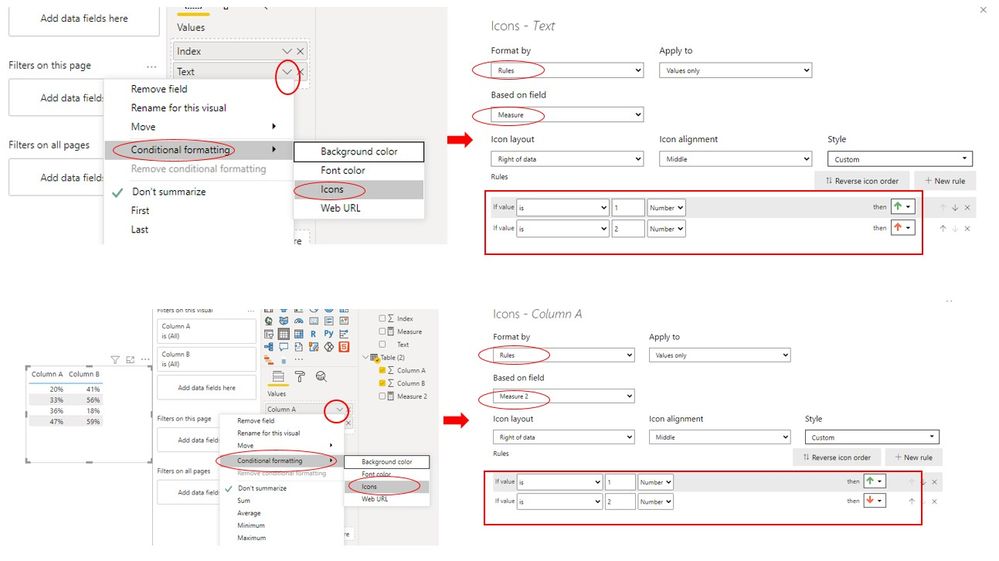
Then select Icons type under Conditional formatting option --> Format by Rules & Based on Measures -->Add rules like this:

conditiona formatting.jpg

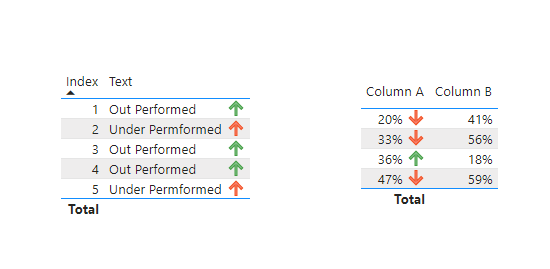
Here is the final output :

output with arrows.PNG

Best Regards,
Eyelyn Qin
If this post helps, then please consider Accept it as the solution to help the other members find it more quickly.

View solution in original post

2 REPLIES 2
Anonymous
Not applicable

Hi @Anonymous ,


It's suggested to create a measure used as a flag as shown below:

Measure = SWITCH(MAX('Table'[Text]),"Out Performed",1,"Under Permformed",2)
Measure 2 = IF(MAX('Table (2)'[Column A]) > MAX('Table (2)'[Column B]),1,2)

Then select Icons type under Conditional formatting option --> Format by Rules & Based on Measures -->Add rules like this:

conditiona formatting.jpg

Here is the final output :

output with arrows.PNG

Best Regards,
Eyelyn Qin
If this post helps, then please consider Accept it as the solution to help the other members find it more quickly.

amitchandak
Super User
Super User

@Anonymous , On is that you can explore icon conditional formatting.


Second, you can create icon measure using unichar and icon color and then put them in new values and conditional  format using field value option


examples


/////Arrow
Arrow =
var _change =[Net Sales YTD]-[Net Sales LYTD]
return
SWITCH (
TRUE(),
_change > 0, UNICHAR(9650),
_change = 0, UNICHAR(9654),
_change < 0, UNICHAR(9660)
)


/////Arrow Color
Arrow color =
var _change =[Net Sales YTD]-[Net Sales LYTD]
return
SWITCH (
TRUE(),
_change > 0, "green",
_change = 0, "blue",
_change < 0, "red"
)


Check more details at

https://exceleratorbi.com.au/conditional-formatting-using-icons-in-power-bi/
https://community.powerbi.com/t5/Desktop/FORMAT-icon-set-for-use-in-a-data-card/td-p/811692

https://exceleratorbi.com.au/dax-unichar-function-power-bi/


More on measure color, conditional formating


https://radacad.com/dax-and-conditional-formatting-better-together-find-the-biggest-and-smallest-numbers-in-the-column
https://docs.microsoft.com/en-us/power-bi/desktop-conditional-table-formatting#color-by-color-values

Share with Power BI Enthusiasts: Full Power BI Video (20 Hours) YouTube
Microsoft Fabric Series 60+ Videos YouTube
Microsoft Fabric Hindi End to End YouTube

Helpful resources

Announcements
Power BI DataViz World Championships

Power BI Dataviz World Championships

The Power BI Data Visualization World Championships is back! Get ahead of the game and start preparing now!

December 2025 Power BI Update Carousel

Power BI Monthly Update - December 2025

Check out the December 2025 Power BI Holiday Recap!

FabCon Atlanta 2026 carousel

FabCon Atlanta 2026

Join us at FabCon Atlanta, March 16-20, for the ultimate Fabric, Power BI, AI and SQL community-led event. Save $200 with code FABCOMM.