Join us at FabCon Atlanta from March 16 - 20, 2026, for the ultimate Fabric, Power BI, AI and SQL community-led event. Save $200 with code FABCOMM.
Register now!The Power BI Data Visualization World Championships is back! Get ahead of the game and start preparing now! Learn more
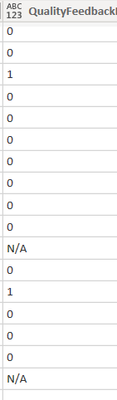
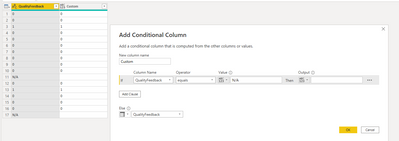
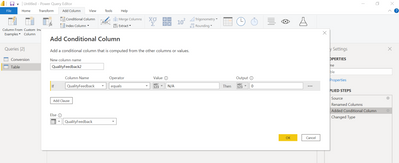
Hello! Is it possible for conditional column to copy the value on the designated column? On this column i cant convert it to number since it have N/A on it i need to show N/A on the dashboard but i cant compute its percentage if it is not a number so im thinking to create a conditional column for this one. If that column have "N/A" it will copy N/A but if the column has value in it, it will copy the value and convert it to number. Is it possible? Thanks in advance!
Solved! Go to Solution.
Hi @Anonymous ,
Power BI is calculated based on columns, so there could be only one data type in one column.
As far as I know, we can show null in number type column in Power BI.
Change the column type to Whole Number. Then you need to use both [QualityFeedback] and [Custom] as conditions in your calculation, due to dax will think blank as 0.
Best Regards,
Rico Zhou
If this post helps, then please consider Accept it as the solution to help the other members find it more quickly.
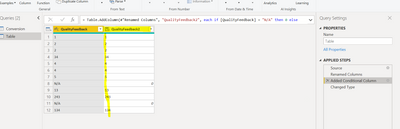
@Anonymous According to your description, you want to Keep N/A value in QualityFeedback field. Since "N/A" is string value hence issue with compute its percentage. I would suggest do not disturb the existing column and create an additional conditional column for percentage computation purposes.
Thanks
Wow this is genius! but if use the qualityfeedback 2 for my gauge chart. How to show that the agent got an N/A instead of 0?
Hi @Anonymous ,
Power BI is calculated based on columns, so there could be only one data type in one column.
As far as I know, we can show null in number type column in Power BI.
Change the column type to Whole Number. Then you need to use both [QualityFeedback] and [Custom] as conditions in your calculation, due to dax will think blank as 0.
Best Regards,
Rico Zhou
If this post helps, then please consider Accept it as the solution to help the other members find it more quickly.
The Power BI Data Visualization World Championships is back! Get ahead of the game and start preparing now!
| User | Count |
|---|---|
| 63 | |
| 55 | |
| 42 | |
| 41 | |
| 23 |
| User | Count |
|---|---|
| 167 | |
| 136 | |
| 120 | |
| 79 | |
| 54 |