cancel
Showing results for 
Search instead for 
Did you mean: 

The Power BI Data Visualization World Championships is back! It's time to submit your entry. Live now!

Reply
sraj
Responsive Resident
Responsive Resident

Condition between two dates

Hi Everyone,


It would be a big help if someone could advise...looking for Employees who have several conditions and one of them is :


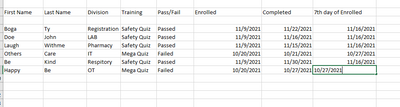
1. If 'Passed' from 1 week of enrolled date


sraj_0-1645730762146.png


I have created a new calculated column to give me the 7th day from the enrolled date which will show me if the user completed it before this date and want only those users who completed it between the 7th day of enrolled date.  


7th Day of Enrolled Date = [Merged] + 7


Now I need to know who are those users who did it...may be another column with Yes or No and filter only those which have 'Yes'?? OR is there anyway I can show which one of them is eligible (7th day of enrolled date is the due date and the complete date should be = or < the Enrolled date)


Can someone please advise on how I can achieve this?


Thank you!


1 ACCEPTED SOLUTION
TheoC
Super User
Super User

Hi @sraj 


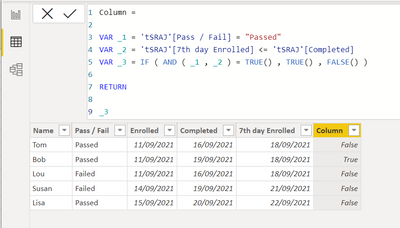
You can use the below calculated column:


Column = 

VAR _1 = 'tSRAJ'[Pass / Fail] = "Passed"
VAR _2 = 'tSRAJ'[7th day Enrolled] <= 'tSRAJ'[Completed]H
VAR _3 = IF ( AND ( _1 , _2 ) = TRUE() , TRUE() , FALSE() )

RETURN

_3

Output is like below:


TheoC_0-1645759158488.png


I used "tSRAJ" as the table name.  Apologies!  Had did a few solutions in the one PBIX to test syntax! Apologies!


Hope this helps!

Theo 🙂


If I have posted a response that resolves your question, please accept it as a solution to formally close the post.

Also, if you are as passionate about Power BI, DAX and data as I am, please feel free to reach out if you have any questions, queries, or if you simply want to connect and talk to another data geek!

Want to connect?www.linkedin.com/in/theoconias

View solution in original post

2 REPLIES 2
sraj
Responsive Resident
Responsive Resident

Great, that worked...Thank you!!

TheoC
Super User
Super User

Hi @sraj 


You can use the below calculated column:


Column = 

VAR _1 = 'tSRAJ'[Pass / Fail] = "Passed"
VAR _2 = 'tSRAJ'[7th day Enrolled] <= 'tSRAJ'[Completed]H
VAR _3 = IF ( AND ( _1 , _2 ) = TRUE() , TRUE() , FALSE() )

RETURN

_3

Output is like below:


TheoC_0-1645759158488.png


I used "tSRAJ" as the table name.  Apologies!  Had did a few solutions in the one PBIX to test syntax! Apologies!


Hope this helps!

Theo 🙂


If I have posted a response that resolves your question, please accept it as a solution to formally close the post.

Also, if you are as passionate about Power BI, DAX and data as I am, please feel free to reach out if you have any questions, queries, or if you simply want to connect and talk to another data geek!

Want to connect?www.linkedin.com/in/theoconias

Helpful resources

Announcements
Power BI DataViz World Championships

Power BI Dataviz World Championships

The Power BI Data Visualization World Championships is back! It's time to submit your entry.

January Power BI Update Carousel

Power BI Monthly Update - January 2026

Check out the January 2026 Power BI update to learn about new features.

FabCon Atlanta 2026 carousel

FabCon Atlanta 2026

Join us at FabCon Atlanta, March 16-20, for the ultimate Fabric, Power BI, AI and SQL community-led event. Save $200 with code FABCOMM.