Don't miss your chance to take exam DP-600 or DP-700 on us!
Request nowLearn from the best! Meet the four finalists headed to the FINALS of the Power BI Dataviz World Championships! Register now
Hello Everyone!
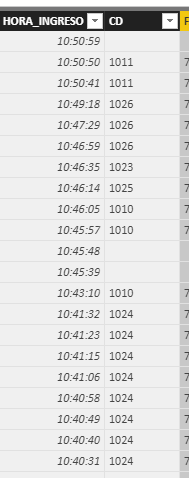
I need your help in calculating a column which give me either a 1 o 0, a 1 when in the column "HORA_INGRESO" is after 10:30 and the column "CD" is 1011, other wise the result wuld be 0.
I am usig this calculated column, and didnt work
HOUR = IF(CABECERAPEDIDOSAP[HORA_INGRESO]>"10:30" && CABECERAPEDIDOSAP[CD]="1011" ;1;0)
Any Ideas?
Thanks for your help
Solved! Go to Solution.
Use the following formula for your calculated column:
IF(Times[Time]>TIME(10, 30, 0) && Times[CD]="1011",1,0)
You'll need to translate that to your column names, but the key is you are comparing your time column to the TIME() function. The && allows you to add additional comparisons to the IF() statement.
DAX is for Analysis. Power Query is for Data Modeling
Proud to be a Super User!
MCSA: BI ReportingHi,
Try this calculated column formula
=IF(AND(CABECERAPEDIDOSAP[HORA_INGRESO]>TIME(10,30,0);CABECERAPEDIDOSAP[CD]="1011");1;0)
Hope this helps.
Hi,
Try this calculated column formula
=IF(AND(CABECERAPEDIDOSAP[HORA_INGRESO]>TIME(10,30,0);CABECERAPEDIDOSAP[CD]="1011");1;0)
Hope this helps.
Use the following formula for your calculated column:
IF(Times[Time]>TIME(10, 30, 0) && Times[CD]="1011",1,0)
You'll need to translate that to your column names, but the key is you are comparing your time column to the TIME() function. The && allows you to add additional comparisons to the IF() statement.
DAX is for Analysis. Power Query is for Data Modeling
Proud to be a Super User!
MCSA: BI ReportingShare feedback directly with Fabric product managers, participate in targeted research studies and influence the Fabric roadmap.
Check out the February 2026 Power BI update to learn about new features.
| User | Count |
|---|---|
| 50 | |
| 40 | |
| 37 | |
| 14 | |
| 14 |
| User | Count |
|---|---|
| 85 | |
| 69 | |
| 37 | |
| 29 | |
| 27 |