
Join us at FabCon Atlanta from March 16 - 20, 2026, for the ultimate Fabric, Power BI, AI and SQL community-led event. Save $200 with code FABCOMM.
Register now!The Power BI Data Visualization World Championships is back! Get ahead of the game and start preparing now! Learn more
Hello,
Apoligies if this is a fairly trivial question, I'm quite new at Power BI.
Is there anyway to remove duplicate columns automatically without losing any data? i.e have my dataset compress all ID's of EX1 into one row instead of multiple. The ID's that I'm using may be repeated due to connections with other columns, but I'm not concerned about that, I'm looking to just get an aggregate for each day. Example:
ID - Store - Total Sales
EX1 - Store 1 - 10
EX1 - Store 2 - 10
I would like it to just be:
ID - Sales
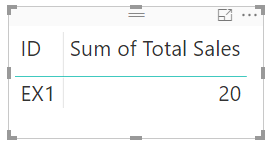
EX1 - 20
I know this is likely easier to just format outside of Power BI, but I'm curious if it's possible to have done in Power BI.
Thanks in advance,
Solved! Go to Solution.
Hi Labossi,
Your data is changing everyday and you want to see the aggregation of data everyday, right?
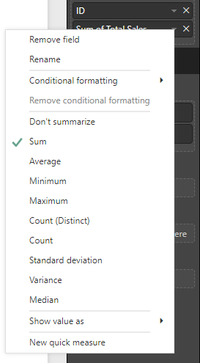
You don't need to change data in data model(e.g.:remove some columns), just drag Total Sales column and ID column into a table chart, then click Total Sales in Values pane -> select Sum
Regards,
Jimmy Tao
Hi Labossi,
Your data is changing everyday and you want to see the aggregation of data everyday, right?
You don't need to change data in data model(e.g.:remove some columns), just drag Total Sales column and ID column into a table chart, then click Total Sales in Values pane -> select Sum
Regards,
Jimmy Tao
In QueryEditor, delete the Store column, close and load.
Unless I'm not understanding your needs, this should work
The Power BI Data Visualization World Championships is back! Get ahead of the game and start preparing now!
| User | Count |
|---|---|
| 37 | |
| 33 | |
| 32 | |
| 31 | |
| 26 |
| User | Count |
|---|---|
| 134 | |
| 96 | |
| 78 | |
| 67 | |
| 65 |