Join us at FabCon Atlanta from March 16 - 20, 2026, for the ultimate Fabric, Power BI, AI and SQL community-led event. Save $200 with code FABCOMM.
Register now!Get Fabric Certified for FREE during Fabric Data Days. Don't miss your chance! Request now
Hi Community,
I want to compose/ merge tables and combine their values. I am looking for a method that uses calculated columns (dax) or power query.
There is a simpliefied scenario:
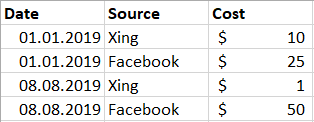
- Table A contains Source Data with Cost
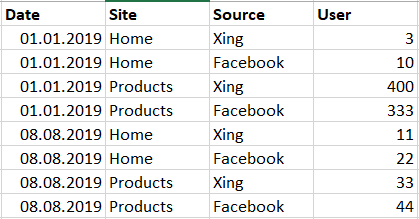
- Table B contains User Date based upon the source Data
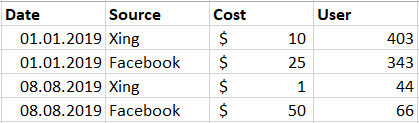
- A third Table A+B should be created. Look at the image example.
Table A:
Table A
Table B:
Table B
Result Table A+B
Result Table A+B
Solved! Go to Solution.
Hi @raymond -
In Power Query, you could do the following:
Hi,
This calculated column formula in Table A will work
=CALCULATE(SUM('Table B'[User]),FILTER('Table B','Table B'[Date]=EARLIER('Table A'[Date])&&'Table B'[Source]=EARLIER('Table A'[Source])))
Hope this helps.
Hi @raymond -
In Power Query, you could do the following:
hi @Anonymous , thank you. That was easy. Say do you know a way to do it with a calculated column too?
@raymond - There are ways to do this, but you wouldn't want to bring a table into Power BI unless you need it there for another purpose.
One way you could do this is:
1. Create a Custom Column in Power Query on each table - concatenate the date and source.
2. Create a Relationship between the tables in Power BI - use the concatenated column for the join.
3. Create a Calculated Column like this:
Sum Of User =
SUMX(
RELATEDTABLE('OtherTable'),
'OtherTable'[User]
)
Check out the November 2025 Power BI update to learn about new features.
Advance your Data & AI career with 50 days of live learning, contests, hands-on challenges, study groups & certifications and more!