Join us at FabCon Atlanta from March 16 - 20, 2026, for the ultimate Fabric, Power BI, AI and SQL community-led event. Save $200 with code FABCOMM.
Register now!The Power BI Data Visualization World Championships is back! Get ahead of the game and start preparing now! Learn more
Hello Community,
I am humbly requesting for contribution on this complex sorting,
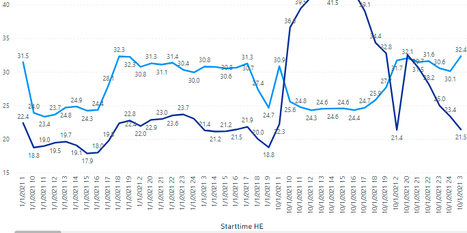
MY CASE : I have a forecast and actual values for 24 hours of the day on three different product, I am representing the data point in a line chart at the hourly level as shown in the chart for each other day for different product . I am finding it difficult to sort daily asc and hourly asc.
I added a slicer just to have just one product in the view at a time , the sortiing is still not right.
the Start time HE was created based on the logic below date and hour for the Axis.
Starttime HE = (CONCATENATE(CONCATENATE(Hourly_Error_compare[date]," "),Hourly_Error_compare[hour_num]))
Current output
Expected output
samplefile in my repo: https://github.com/erosons/PowerBI/blob/main/sample%20file.xlsx
Thank you.
Sam
Solved! Go to Solution.
@Anonymous why not you use date/time on the x-axis, seems like you are using a text column on the x-axis and that's your issue, if you change that date to date/time it will fix and will sort correctly.
✨ Follow us on LinkedIn
Learn about conditional formatting at Microsoft Reactor
My latest blog post The Power of Using Calculation Groups with Inactive Relationships (Part 1) (perytus.com) I would ❤ Kudos if my solution helped. 👉 If you can spend time posting the question, you can also make efforts to give Kudos to whoever helped to solve your problem. It is a token of appreciation!
⚡ Visit us at https://perytus.com, your one-stop-shop for Power BI-related projects/training/consultancy.⚡
Subscribe to the @PowerBIHowTo YT channel for an upcoming video on List and Record functions in Power Query!!
Learn Power BI and Fabric - subscribe to our YT channel - Click here: @PowerBIHowTo
If my solution proved useful, I'd be delighted to receive Kudos. When you put effort into asking a question, it's equally thoughtful to acknowledge and give Kudos to the individual who helped you solve the problem. It's a small gesture that shows appreciation and encouragement! ❤
Did I answer your question? Mark my post as a solution. Proud to be a Super User! Appreciate your Kudos 🙂
Feel free to email me with any of your BI needs.
@Anonymous why not you use date/time on the x-axis, seems like you are using a text column on the x-axis and that's your issue, if you change that date to date/time it will fix and will sort correctly.
✨ Follow us on LinkedIn
Learn about conditional formatting at Microsoft Reactor
My latest blog post The Power of Using Calculation Groups with Inactive Relationships (Part 1) (perytus.com) I would ❤ Kudos if my solution helped. 👉 If you can spend time posting the question, you can also make efforts to give Kudos to whoever helped to solve your problem. It is a token of appreciation!
⚡ Visit us at https://perytus.com, your one-stop-shop for Power BI-related projects/training/consultancy.⚡
Subscribe to the @PowerBIHowTo YT channel for an upcoming video on List and Record functions in Power Query!!
Learn Power BI and Fabric - subscribe to our YT channel - Click here: @PowerBIHowTo
If my solution proved useful, I'd be delighted to receive Kudos. When you put effort into asking a question, it's equally thoughtful to acknowledge and give Kudos to the individual who helped you solve the problem. It's a small gesture that shows appreciation and encouragement! ❤
Did I answer your question? Mark my post as a solution. Proud to be a Super User! Appreciate your Kudos 🙂
Feel free to email me with any of your BI needs.
Thanks for the insight, I added hour to the datetime hierarchy and drill down.
The Power BI Data Visualization World Championships is back! Get ahead of the game and start preparing now!
| User | Count |
|---|---|
| 40 | |
| 36 | |
| 34 | |
| 31 | |
| 27 |
| User | Count |
|---|---|
| 136 | |
| 103 | |
| 67 | |
| 65 | |
| 56 |