cancel
Showing results for 
Search instead for 
Did you mean: 

The Power BI Data Visualization World Championships is back! Get ahead of the game and start preparing now! Learn more

Reply
facilitydax
Frequent Visitor

Complex long term forecasting

Hi, I have long term forecasting algorithms built into my power bi file through various measures. For example, for a facility I can predict out the projected condition (1-100) over time which shows a lifecycle curve of the building. I've also built "standards" into the model where if a building falls below certain standards, it's flagged for either new construction, restoration, etc... What I want to do now is be able to put in a budget (for example an annual restoration budget = $1M) and forecast out over time if my backlog will continue to grow or if that's an adequate budget. If I were doing this in excel, I'd sort (descending) my buildings by a prioritization index of importance (which I do have), then do a cumulative sum of restoration cost, and when my cumulative sum hit the $1M budget, then that would be my first year of funded restoration projects. Then I start at the next building and continue going down my list in $1M chunks to get my long term forecasting plan. However, I can't think of how to accomplish this in Power BI dynamically. Any suggestions on where to start?

3 REPLIES 3
v-eachen-msft
Community Support
Community Support

Hi @facilitydax ,


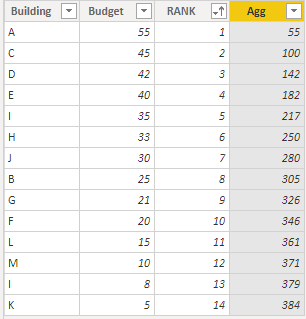
Here is my sample data.

1-1.PNG

The "Rank" and "Agg" column is make newly. 

RANK =
RANKX ( TABLE1, TABLE1[Budget],, DESC, DENSE )
Agg =
CALCULATE (
    SUM ( TABLE1[Budget] ),
    FILTER ( TABLE1, TABLE1[RANK] <= EARLIER ( TABLE1[RANK] ) )
)

Then you can get your forecasting plan every 1M dollars.


Community Support Team _ Eads
If this post helps, then please consider Accept it as the solution to help the other members find it.

So here's where I'm at with my testing.  I have "RankTest" which is ranking based on the PrioritizationScore_v2 which is working fine. However, like I stated before, I'm having trouble with my running total since I'm ordering this running total by a measure. You can see in the last column of this table (Agg_Test), the Unconstrained_event(cost) is not totalling cumulatively like I want. 

rankscreenshot.jpg

Here's the Agg_Test measure:

Agg_Test = 
CALCULATE(
	[UNCONSTRAINED_EVENT(COST)],
	FILTER(
		ALLSELECTED('ISR-MASTER-ALLOCATION'[RPUIDCATCODE]),
		ISONORAFTER([RankTest], MAXX('ISR-MASTER-ALLOCATION', [RankTest]), ASC)
	)
)

@v-eachen-msft , Thanks for the reply. In theory this approach should get me started. However, I've had some problems trying something like this since Rank is a measure and my Budget is also a measure.  Therefore, I can't do a simple "sum" on the budget and I can't use the "earlier" function for the Rank. 

Any thoughts on getting around these two things?  I could do a SUMX for the budget part but still not sure how to handle the "earlier" function on a measure.


Thanks! 

Helpful resources

Announcements
Power BI DataViz World Championships

Power BI Dataviz World Championships

The Power BI Data Visualization World Championships is back! Get ahead of the game and start preparing now!

December 2025 Power BI Update Carousel

Power BI Monthly Update - December 2025

Check out the December 2025 Power BI Holiday Recap!

FabCon Atlanta 2026 carousel

FabCon Atlanta 2026

Join us at FabCon Atlanta, March 16-20, for the ultimate Fabric, Power BI, AI and SQL community-led event. Save $200 with code FABCOMM.