Join us at FabCon Atlanta from March 16 - 20, 2026, for the ultimate Fabric, Power BI, AI and SQL community-led event. Save $200 with code FABCOMM.
Register now!Get Fabric Certified for FREE during Fabric Data Days. Don't miss your chance! Request now
Dear All,
Could some one help me please,
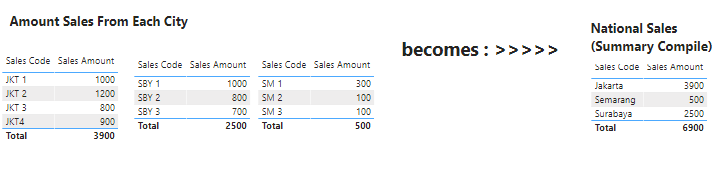
I have 3 amount Sales tables from Each City, and I want to make output as One Table as National Sales Amount here
Here is the PBIX file : https://ptaab-my.sharepoint.com/:u:/g/personal/akristyonoputro_asuransiastra_com/EdNmrVSC7vRHiCCdjay...
Thankyou for helping me,
Regards,
AJi
Solved! Go to Solution.
@Ajeck , you can append the tree tables
https://radacad.com/append-vs-merge-in-power-bi-and-power-query
https://www.sqlbi.com/articles/from-sql-to-dax-joining-tables/
Hi @Ajeck ,
Please follow the below steps to achieve it, you can find all details in this updated file.
1. Create a summary table with different score codes
2. Create 3 measures and 1 calculated column to get the sum sales per sales code
Jakarta = SUM('Jakarta'[Sales Amount])Semarang = SUM('Smrg'[Sales Amount])Surabaya = SUM('Surabaya'[Sales Amount])Sales Amount = SWITCH('Summary Table'[Sales Code],"Jakarta",[Jakarta],"Semarang",[Semarang],"Surabaya",[Surabaya])3. Drag the field "Sales Code" of table Summary Table and measure "Sales Amount" onto table visual
In addition, you can achieve it in Power Query Editor. I just create another sample file, you can check the applied steps in it.
Note: It is better to download the latest version of Power BI Desktop in order to open these sample files successfully.
Best Regards
Rena
Hi @Ajeck ,
Please follow the below steps to achieve it, you can find all details in this updated file.
1. Create a summary table with different score codes
2. Create 3 measures and 1 calculated column to get the sum sales per sales code
Jakarta = SUM('Jakarta'[Sales Amount])Semarang = SUM('Smrg'[Sales Amount])Surabaya = SUM('Surabaya'[Sales Amount])Sales Amount = SWITCH('Summary Table'[Sales Code],"Jakarta",[Jakarta],"Semarang",[Semarang],"Surabaya",[Surabaya])3. Drag the field "Sales Code" of table Summary Table and measure "Sales Amount" onto table visual
In addition, you can achieve it in Power Query Editor. I just create another sample file, you can check the applied steps in it.
Note: It is better to download the latest version of Power BI Desktop in order to open these sample files successfully.
Best Regards
Rena
@Ajeck , you can append the tree tables
https://radacad.com/append-vs-merge-in-power-bi-and-power-query
https://www.sqlbi.com/articles/from-sql-to-dax-joining-tables/
Check out the November 2025 Power BI update to learn about new features.
Advance your Data & AI career with 50 days of live learning, contests, hands-on challenges, study groups & certifications and more!