FabCon is coming to Atlanta
Join us at FabCon Atlanta from March 16 - 20, 2026, for the ultimate Fabric, Power BI, AI and SQL community-led event. Save $200 with code FABCOMM.
Register now!- Power BI forums
- Get Help with Power BI
- Desktop
- Service
- Report Server
- Power Query
- Mobile Apps
- Developer
- DAX Commands and Tips
- Custom Visuals Development Discussion
- Health and Life Sciences
- Power BI Spanish forums
- Translated Spanish Desktop
- Training and Consulting
- Instructor Led Training
- Dashboard in a Day for Women, by Women
- Galleries
- Data Stories Gallery
- Themes Gallery
- Contests Gallery
- QuickViz Gallery
- Quick Measures Gallery
- Visual Calculations Gallery
- Notebook Gallery
- Translytical Task Flow Gallery
- TMDL Gallery
- R Script Showcase
- Webinars and Video Gallery
- Ideas
- Custom Visuals Ideas (read-only)
- Issues
- Issues
- Events
- Upcoming Events
The Power BI Data Visualization World Championships is back! Get ahead of the game and start preparing now! Learn more
- Power BI forums
- Forums
- Get Help with Power BI
- Desktop
- Comparing values from two different table on table...
- Subscribe to RSS Feed
- Mark Topic as New
- Mark Topic as Read
- Float this Topic for Current User
- Bookmark
- Subscribe
- Printer Friendly Page

- Mark as New
- Bookmark
- Subscribe
- Mute
- Subscribe to RSS Feed
- Permalink
- Report Inappropriate Content
Comparing values from two different table on table visual
Greetings,
I'm struggling to find a solution to my problem.
I have two related tables as following:
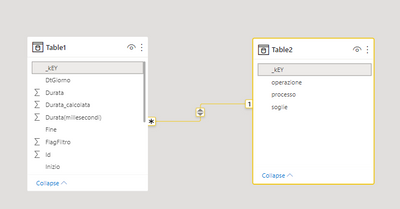
I'm trying to calculate this measure that i need to insert inside a table visual.
var a = MAX(Table1[Durata])
var b = MAX(Table2[soglie])
return

SWITCH(TRUE,
        a > b , -1,
        a < b , 1,
        0)
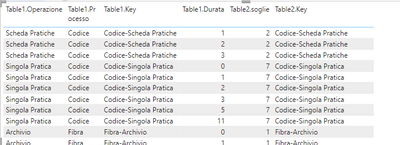
This is the table, as you can see the relation between Table1.key and Table2.key is working as expected.
And this is the result adding the measure.
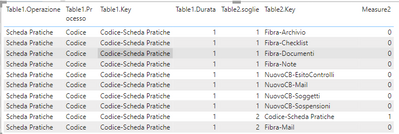
What exactly I'm not understanding? Of course this is related to switch and if function..... but I'm not getting it.
Any help would be much appreciated
Solved! Go to Solution.


- Mark as New
- Bookmark
- Subscribe
- Mute
- Subscribe to RSS Feed
- Permalink
- Report Inappropriate Content
There must be a better way of doing this, but the below seems to work
Measure =
var Table2Keys = SUMMARIZE( Table1, Table2[_kEY])
var CurrentKey = SELECTEDVALUE(Table1[_kEY])
RETURN IF( CurrentKey IN Table2Keys,
        var a = MAX(Table1[Durata])
        var b = MAX(Table2[soglie])
        return

        SWITCH(TRUE,
                a > b , -1,
                a < b , 1,
                0)
)
- Mark as New
- Bookmark
- Subscribe
- Mute
- Subscribe to RSS Feed
- Permalink
- Report Inappropriate Content
Having a bidirectional many-to-one relationship is usually a bad idea, try changing it to a single direction if you can.
- Mark as New
- Bookmark
- Subscribe
- Mute
- Subscribe to RSS Feed
- Permalink
- Report Inappropriate Content
i already try:
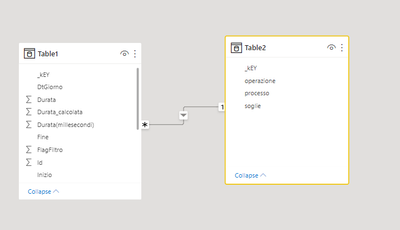
and this does not change the result....

if in the measure i m not using the switch or if function, it's working properly.
Any idea??
- Mark as New
- Bookmark
- Subscribe
- Mute
- Subscribe to RSS Feed
- Permalink
- Report Inappropriate Content
Can you copy the code generated for the table visual from Performance Analyzer and paste it in here? Or can you share a PBIX file with any confidential info removed ?
- Mark as New
- Bookmark
- Subscribe
- Mute
- Subscribe to RSS Feed
- Permalink
- Report Inappropriate Content
// DAX Query
DEFINE
  VAR __DS0Core =
    SUMMARIZECOLUMNS(
      ROLLUPADDISSUBTOTAL(
        ROLLUPGROUP(
          'Table1'[_kEY],
          'Table1'[Durata],
          'Table2'[soglie],
          'Table2'[_kEY],
          'Table1'[Operazione],
          'Table1'[Processo]
        ), "IsGrandTotalRowTotal"
      ),
      "Measure2", 'Table1'[Measure2]
    )

  VAR __DS0PrimaryWindowed =
    TOPN(
      502,
      __DS0Core,
      [IsGrandTotalRowTotal],
      0,
      'Table1'[_kEY],
      1,
      'Table1'[Durata],
      1,
      'Table2'[soglie],
      1,
      'Table2'[_kEY],
      1,
      'Table1'[Operazione],
      1,
      'Table1'[Processo],
      1
    )

EVALUATE
  __DS0PrimaryWindowed

ORDER BY
  [IsGrandTotalRowTotal] DESC,
  'Table1'[_kEY],
  'Table1'[Durata],
  'Table2'[soglie],
  'Table2'[_kEY],
  'Table1'[Operazione],
'Table1'[Processo]- Mark as New
- Bookmark
- Subscribe
- Mute
- Subscribe to RSS Feed
- Permalink
- Report Inappropriate Content
- Mark as New
- Bookmark
- Subscribe
- Mute
- Subscribe to RSS Feed
- Permalink
- Report Inappropriate Content
There must be a better way of doing this, but the below seems to work
Measure =
var Table2Keys = SUMMARIZE( Table1, Table2[_kEY])
var CurrentKey = SELECTEDVALUE(Table1[_kEY])
RETURN IF( CurrentKey IN Table2Keys,
        var a = MAX(Table1[Durata])
        var b = MAX(Table2[soglie])
        return

        SWITCH(TRUE,
                a > b , -1,
                a < b , 1,
                0)
)
- Mark as New
- Bookmark
- Subscribe
- Mute
- Subscribe to RSS Feed
- Permalink
- Report Inappropriate Content
It's working ...
the thing that bothers me the most is not understanding the behavior of my measure.
- Mark as New
- Bookmark
- Subscribe
- Mute
- Subscribe to RSS Feed
- Permalink
- Report Inappropriate Content
The problem lay in the behaviour of SUMMARIZECOLUMNS and the fact that your measure was not returning blank for invalid combinations of rows from table 1 and table 2.
I don't fully understand the workings of SUMMARIZECOLUMNS, but it looks like it was returning all possible combinations of rows from table 1 & 2, rather than using the relationship, but it will only return combinations where the measures being summarized do not return a blank.
The code I wrote seeks to establish whether the current combination is a valid one, given the relationship, and only return a value in the case of valid combinations.
Helpful resources

Power BI Dataviz World Championships
The Power BI Data Visualization World Championships is back! Get ahead of the game and start preparing now!

Power BI Monthly Update - December 2025
Check out the December 2025 Power BI Holiday Recap!

FabCon Atlanta 2026
Join us at FabCon Atlanta, March 16-20, for the ultimate Fabric, Power BI, AI and SQL community-led event. Save $200 with code FABCOMM.

| User | Count |
|---|---|
| 46 | |
| 41 | |
| 34 | |
| 32 | |
| 23 |


| User | Count |
|---|---|
| 125 | |
| 119 | |
| 90 | |
| 75 | |
| 69 |


