Hi all,
Apologies if this sort of thing has been asked already i'm still trying to find my way around the forum!. I'm trying to create a report in which shows completed and incompleted training off of a sharepoint online list. My goal is to be able to click on a training module and then have the completed training appear with the names in one column and those who have not completed the training appear next to it in another column (or can be in two tables it isnt a problem either way).
So far I have these tables connected:
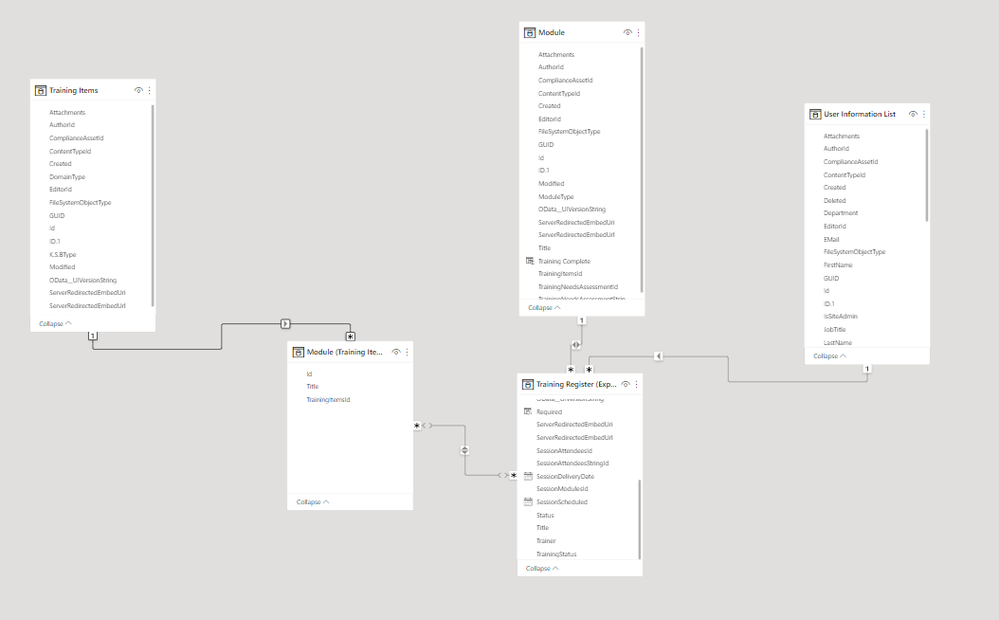
What contains what?:
Training Items contains each type of session that is covered per module.
Module (Training Items) contains the extracted IDs of the training items (as there are multiple per module).
Module is the table that contains the information about each module and also the Training Needs Assessment ID which tells you who needs the training for a specific module.
Training Register contains the session attendees ID's, module ID's and anything else related to the module.
User Information List contains the employee information including their ID's.
If there is anything info that i'm missing please let me know but I really appreciate any help that comes!
(Rough outcome:
 )
)


