Join us at FabCon Atlanta from March 16 - 20, 2026, for the ultimate Fabric, Power BI, AI and SQL community-led event. Save $200 with code FABCOMM.
Register now!The Power BI Data Visualization World Championships is back! It's time to submit your entry. Live now!
I had an issue with a data set that I previously posted about. However, I've been given additional information/direction from the owners so now I'm dealing with a different challenges.
I have a list of items I'm try to measure against, all of which are collected throughout two columns assigned and completed. I left them as-is, and end up creating a series (about 10) columns to returns results with formulas based on the values or relationships between these columns. I have now split one of the cells by semi-colon into new rows. As a benefit this allows me a unique count of items. However, it breaks a formula I had that compares the two columns. For examples, I had:
Column A
Apple; Orange; Kiwi
Appple
Kiwi
Orange; Kiwi
Column B
Apple; Orange
Appple
{Blank}
Kiwi
Now, I have the following for just the first row:
Column A
Apple
Orange
Kiwi
Column B
Apple; Orange
Apple; Orange
Apple; Orange
How, I can I return the same if x, then true,fale results to compare the collective value of a series against the column B grouping? If it helps, each row contains a unique ID (which has been carried down to multiple rows when I split on column A).
Thanks.
Hi dmouser,
"How, I can I return the same if x, then true,fale results to compare the collective value of a series against the column B grouping?"
<--- Could you clarify more details about your logic to achieve this?
Regards,
Jimmy Tao
I may have solved this, but identified another challenge as a result. So I could leave my formulas unaltered, I added a step to copy the column, then split. Not sure if this is a best practice or not, but it allowed me to keep the original column and values to base my formula from.
However, my formula was comparing values of Column A to Column B to determine if they align. However, I noticed the sequences are not consistent, even though the values are. So if I'm comparing this Apple; Orange; Kiwi to Kiwi; Apple; Orange they don't match even though the content align. I do have the items in another table with their own IDs.
Can I sum of the values in the cell if they are found?
Fruite | ID
Apple = 1
Pear = 2
Orange = 3
Kiwi = 5
Peach = 4
Identified Fruits: Apple; Orange; Kiwi - sum of IDs = 9
Deliverd Fruits: Kiwi; Apple; Orange - sum of IDs = 9
Hi dmouser ,
"So if I'm comparing this Apple; Orange; Kiwi to Kiwi; Apple; Orange they don't match even though the content align. I do have the items in another table with their own IDs. "
<---Could you share some sample data and results you want to achieve and explain more details about your requirement?
Regards,
Jimmy Tao
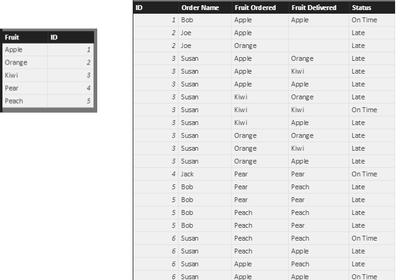
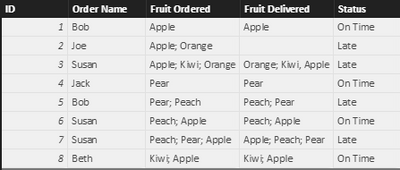
I don't have a public file host, but did draft up a dummy workbook based on fruit. Image of two tables is below. I also uploaded a copy of the second table before manipulation to see how the sequence affects the outcome. Youll notice on the original while all 3 fruits were deliverred, because the sequence is different the calculation thinks they don't match and are therefore late.
I located the following post on the boards which - I think - gets to the same questions solution. However, the instructions are a bit choppy and I'm having difficulty following them. Ironically, the example uses fruit too. ![]()
Creating a total score for values in a concatenated and comma separated list
The Power BI Data Visualization World Championships is back! It's time to submit your entry.
Check out the January 2026 Power BI update to learn about new features.
| User | Count |
|---|---|
| 56 | |
| 40 | |
| 38 | |
| 21 | |
| 20 |
| User | Count |
|---|---|
| 142 | |
| 105 | |
| 63 | |
| 36 | |
| 35 |