Join us at FabCon Atlanta from March 16 - 20, 2026, for the ultimate Fabric, Power BI, AI and SQL community-led event. Save $200 with code FABCOMM.
Register now!Get Fabric Certified for FREE during Fabric Data Days. Don't miss your chance! Request now
I am a novice to Power BI, and Dax. I could not find an example, or question related to my challenge. I have a series of test as follows:
Test 1, date, time, value
Test 2, date, time, value
Test 3, date, time, value
I want to graph the lapse time in hours from FIRSTDATE [date],[time] to LASTDATE [date],[time] of each test set, and then while using a single graph, plot each hour for each test, showing a comparison overtime to itself, as well as to the other test sets.
The first entry for each test set (Test 1, Test 2, Test 3) would have a lapse time of ZERO hours, as this entry is the starting point, the subsequencial entries would caculate the lapse time between the starting point, and the current entry date/time.
I just cannot seem to an example or similiar question that demos my outcome.
@sport wrote:I am a novice to Power BI, and Dax. I could not find an example, or question related to my challenge. I have a series of test as follows:
Test 1, date, time, value
Test 2, date, time, value
Test 3, date, time, value
I want to graph the lapse time in hours from FIRSTDATE [date],[time] to LASTDATE [date],[time] of each test set, and then while using a single graph, plot each hour for each test, showing a comparison overtime to itself, as well as to the other test sets.
The first entry for each test set (Test 1, Test 2, Test 3) would have a lapse time of ZERO hours, as this entry is the starting point, the subsequencial entries would caculate the lapse time between the starting point, and the current entry date/time.
I just cannot seem to an example or similiar question that demos my outcome.
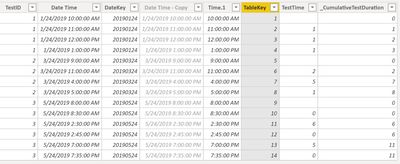
I used 2 calculated columns:
TestTime = length of each test
_CumulativeTestTime = cumulative sum of the individual test entries by Test set
TestResults Table
Use DateDiff to measure the time change
_CumulativeTestDuration =
DATEDIFF (
CALCULATE (
MIN ( 'TestResults'[Date Time] ),
FILTER (
'TestResults',
'TestResults'[TestID] = EARLIER ( 'TestResults'[TestID] )
)
),
'TestResults'[Date Time],
HOUR
)
End Visualization
Final Visualization
Check out the November 2025 Power BI update to learn about new features.
Advance your Data & AI career with 50 days of live learning, contests, hands-on challenges, study groups & certifications and more!