cancel
Showing results for 
Search instead for 
Did you mean: 

Get Fabric Certified for FREE during Fabric Data Days. Don't miss your chance! Request now

Reply
aishak12
Helper IV
Helper IV

Combining two visuals

All, 


I have two stacked column charts. I want to combine the visuals to plot both values into one chart. It should show two different colors in the new chart.


The SUM value in chart 1 in one color and the SUM value in chart 2 in another color. 


1) 

Label 1,2,3,4 Selected:
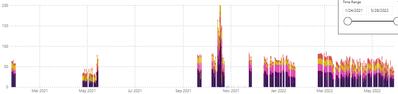
aishak12_0-1659275258109.png


2) 

Label 5 Selected:

aishak12_1-1659275275249.png


This is the format of my data:


Column 1)                 Column 2)

Label 1                       10

Label 2                       20

Label 3                       30

Label 4                       25

Label 5                       40

1 REPLY 1
amitchandak
Super User
Super User

@aishak12 , Create a new column

COl3 = Switch( True(),

[Column 1] ="Label 5" , "A", "B")


Use this in small multiples

Share with Power BI Enthusiasts: Full Power BI Video (20 Hours) YouTube
Microsoft Fabric Series 60+ Videos YouTube
Microsoft Fabric Hindi End to End YouTube

Helpful resources

Announcements
November Power BI Update Carousel

Power BI Monthly Update - November 2025

Check out the November 2025 Power BI update to learn about new features.

Fabric Data Days Carousel

Fabric Data Days

Advance your Data & AI career with 50 days of live learning, contests, hands-on challenges, study groups & certifications and more!

FabCon Atlanta 2026 carousel

FabCon Atlanta 2026

Join us at FabCon Atlanta, March 16-20, for the ultimate Fabric, Power BI, AI and SQL community-led event. Save $200 with code FABCOMM.

Top Solution Authors
Top Kudoed Authors