Hello! I'm relatively new to Power BI and I'm teaching myself as I go. I'm running into an issue that I can't youtube tutorial myself out of.
I'm working on a report that tracks print jobs at my organization, and I'm trying to break it down by department, so we can see how many print jobs each department has per month, per year, etc...
My data source is a master log of all print jobs broken down by printer, and what I am trying to do is select all the printers for a specific department (say, Accounting) and then display that as a graph that shows how many the Accounting department has done over a span of time. To achieve this I added my printers and time as my x-axis, and filtered the printers to only display the accounting specific printers. What happened though is that the x-axis is now broken down into 3 sections, one for each printer, as opposed to giving me the combined total of my filter.
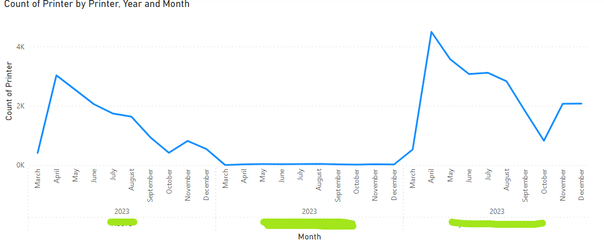
I have tried to add those specific printers as a group, but they still display the same way. I've looked at some DAX expressions here, and none have quite seemed to do what I want to do.
What I would like for the x-axis to look like is just all of the Accounting printers totaled together, so the graph is tracking total print jobs over time, but just showing the totals of the Accoutning department as opposed to each individual printer.
Any help would be appreciated!


