cancel
Showing results for 
Search instead for 
Did you mean: 

The Power BI Data Visualization World Championships is back! Get ahead of the game and start preparing now! Learn more

Reply
NickProp28
Post Partisan
Post Partisan

Column and Measure (DIVIDE)

Dear Community, 


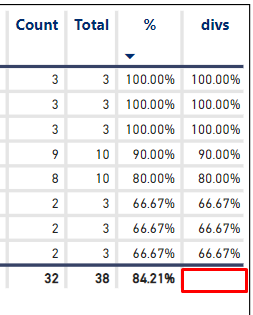
My measure and column have the same formula, but the column didn't display the 84.21%.

NickProp28_0-1665628602129.png

Btw,all these selections did not get the result I was looking for

NickProp28_1-1665628812720.png

Formula

Measure:

% = DIVIDE(SUM('SIT'[C_Count]), SUM('SIT'[Total]))

Column: 

divs = DIVIDE(SIT[C_Count] ,SIT[Total])

Any assistance would be greatly appreciated

Thank you!

1 ACCEPTED SOLUTION

Hi @NickProp28 ,


According to your description, here is my solution.

You cannot use a calculated column to display 84.21% in the bottom total value of a table or matrix.

When you use calculated column, of course, if you use "Don't summarise", it will not do any summary calculations. But, even if you choose "Sum", it just sums the values in the current column instead of using the same calculated column formula.

When a Measure is used on rows in a table, the column total for those rows is not calculated based on a sum of the results in the rows, but instead it calculates using the same Measure formula and applies it to the total of the data selected.


Please refer to the following documents.

Create a matrix visual in Power BI - Power BI | Microsoft Learn

How to Make Measures Total Correctly in Power BI Tables - ArcherPoint

Power BI Column vs Measure. Which one should I use and when? | by Peter Hui | Towards Data Science


Best Regards,
Community Support Team _ xiaosun

If this post helps, then please consider Accept it as the solution to help the other members find it more quickly.

View solution in original post

3 REPLIES 3
amitchandak
Super User
Super User

@NickProp28 , For a don't Summarize column you will not get total. (Based on what I got)

Share with Power BI Enthusiasts: Full Power BI Video (20 Hours) YouTube
Microsoft Fabric Series 60+ Videos YouTube
Microsoft Fabric Hindi End to End YouTube

Dear @amitchandak ,


Yup, but I will still not get the 84.21% result if I select median.

NickProp28_4-1665630190479.png

Would it be possible to get the 84.21% in a column format?

Hi @NickProp28 ,


According to your description, here is my solution.

You cannot use a calculated column to display 84.21% in the bottom total value of a table or matrix.

When you use calculated column, of course, if you use "Don't summarise", it will not do any summary calculations. But, even if you choose "Sum", it just sums the values in the current column instead of using the same calculated column formula.

When a Measure is used on rows in a table, the column total for those rows is not calculated based on a sum of the results in the rows, but instead it calculates using the same Measure formula and applies it to the total of the data selected.


Please refer to the following documents.

Create a matrix visual in Power BI - Power BI | Microsoft Learn

How to Make Measures Total Correctly in Power BI Tables - ArcherPoint

Power BI Column vs Measure. Which one should I use and when? | by Peter Hui | Towards Data Science


Best Regards,
Community Support Team _ xiaosun

If this post helps, then please consider Accept it as the solution to help the other members find it more quickly.

Helpful resources

Announcements
Power BI DataViz World Championships

Power BI Dataviz World Championships

The Power BI Data Visualization World Championships is back! Get ahead of the game and start preparing now!

December 2025 Power BI Update Carousel

Power BI Monthly Update - December 2025

Check out the December 2025 Power BI Holiday Recap!

FabCon Atlanta 2026 carousel

FabCon Atlanta 2026

Join us at FabCon Atlanta, March 16-20, for the ultimate Fabric, Power BI, AI and SQL community-led event. Save $200 with code FABCOMM.