cancel
Showing results for 
Search instead for 
Did you mean: 

Try your skills in the Power BI Dataviz World Championship! Round one ends June 26. Join now

Reply
Anonymous
Not applicable

Column Error

Hello,

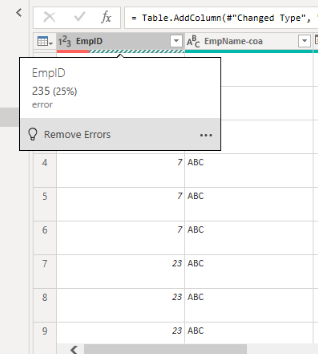
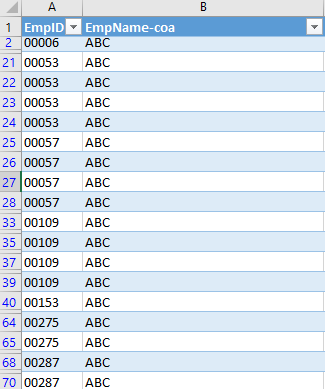
When i get data from an Excel sheet Powerbi shows error and remove all 0's in front of the EmpID.In Excel it looks totally fine.

Please help me solve it.

Thanks

pbi.PNGExc.PNG

1 ACCEPTED SOLUTION
helassal
Resolver II
Resolver II

@Anonymous ,


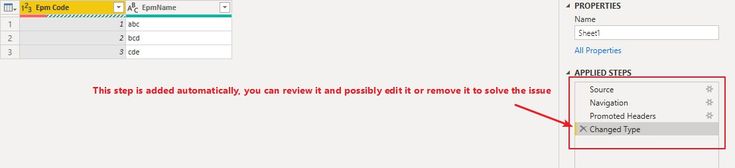
Hi, from looking at the power bi snapshot, it is possible that power bi decided to convert the ID column to whole number (hence, the removed zeroes) but then the conversion failed for some records (235 erros). If that's the case, you can modify or remove the conversion logic that was automatically added to the steps. (check the following snapshot).


In case this doesn't solve it, if you can share a screenshot of the M script from the advanced query editor (after removing any sensitive information), may be we can help you better.


Excel_Conversion_Issue.jpg

View solution in original post

1 REPLY 1
helassal
Resolver II
Resolver II

@Anonymous ,


Hi, from looking at the power bi snapshot, it is possible that power bi decided to convert the ID column to whole number (hence, the removed zeroes) but then the conversion failed for some records (235 erros). If that's the case, you can modify or remove the conversion logic that was automatically added to the steps. (check the following snapshot).


In case this doesn't solve it, if you can share a screenshot of the M script from the advanced query editor (after removing any sensitive information), may be we can help you better.


Excel_Conversion_Issue.jpg

Helpful resources

Announcements
Fabric Data Days is here Carousel

Data Days 2026

Don't miss out on Data Days, June 15 through August 7. Learn Fabric, Power BI, SQL, AI and more.

Power BI DataViz World Championships carousel

Power BI DataViz World Championships - June 2026

A new Power BI DataViz World Championship is coming this June! Don't miss out on submitting your entry.