cancel
Showing results for 
Search instead for 
Did you mean: 

Get Fabric Certified for FREE during AI Skills Fest. This week only. Secure your voucher now.

Reply
Anonymous
Not applicable

Coloring maps

Hello, all !

Help pls, I have a sales table by points for the Floating period. All dates are the dates of the last day of the month, except the last, that is, 2018 December - 2018/12/31 , 2019 January - 2019/01/31, 2019 February - 2019/02/15.

Like a table :

datetradePointsales
31.12.19A10
31.12.19F10
31.12.19B5
31.12.19D10
31.01.19D5
31.01.19G0
31.01.19C10
31.01.19E5
15.02.19A10
15.02.19C5
15.02.19D10


In this case, it should be the following coloring, Green color: A,C,D ; Red Color: B,E,F ; Blank: G


Task:
1. It is necessary to paint the dots on the map green if sales were in the finish month.
2. If there were sales in the last month, excluding the last month, then red (but you need to take into account that in the first paragraph some points should already be painted in green color)
3. If the not be sales at these points, then empty

I I tried to do it like this: if 1 - red , 2- green, on the map.

Indicator = IF( CALCULATE(SUM([Sum]);
FILTER(Data_query; Data_query[period] = [MaxDate]))>0;2;
IF(CALCULATE(SUM([Sum]);
FILTER(Data_query; Data_query[period] <= EOMONTH([MaxDate];-1) && Data_query[period] >= MIN(Data_query[period])))>0;1;BLANK()))

But total value , only "2" 
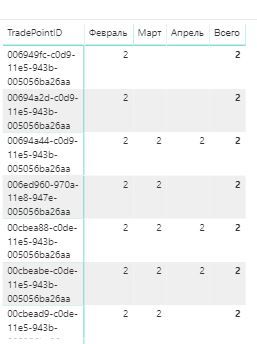
Maps coloring_1.JPG


If you have any ideas how to get: 1,2, and blank() please write measure


Thank you in advance


2 REPLIES 2
v-yuta-msft
Community Support
Community Support

@Anonymous ,


I would suggest you to refer to conditional formatting.

https://docs.microsoft.com/en-us/power-bi/desktop-conditional-table-formatting


Community Support Team _ Jimmy Tao

If this post helps, then please consider Accept it as the solution to help the other members find it more quickly.

Anonymous
Not applicable

@v-yuta-msft  Hi,


I know how to use formatting. 
My problem is that I can not divide the pool of points into 3 parts; points of this month should be active (green), but because the report uses a filter; I do not know for what period there will be a data set, and points that were not active this month, but had sales (red), the rest, which did not have sales or were negative sales, should not be displayed. The visual element "Map" does not take into account the data for the month, which it views the total. If you look at the last picture, then everything will become clear to you. Instead of dividing for parts, the measure gives only one value for the totals, and not what I need.

Helpful resources

Announcements
May Power BI Update Carousel

Power BI Monthly Update - May 2026

Check out the May 2026 Power BI update to learn about new features.

Fabric SQL PBI Data Days

Data Days 2026 coming soon!

Sign up to receive a private message when registration opens and key events begin.

New to Fabric survey Carousel

New to Fabric Survey

If you have recently started exploring Fabric, we'd love to hear how it's going. Your feedback can help with product improvements.

Power BI DataViz World Championships carousel

Power BI DataViz World Championships - June 2026

A new Power BI DataViz World Championship is coming this June! Don't miss out on submitting your entry.