cancel
Showing results for 
Search instead for 
Did you mean: 

Learn from the best! Meet the four finalists headed to the FINALS of the Power BI Dataviz World Championships! Register now

Reply
jeoosma
Helper II
Helper II

Color Bar

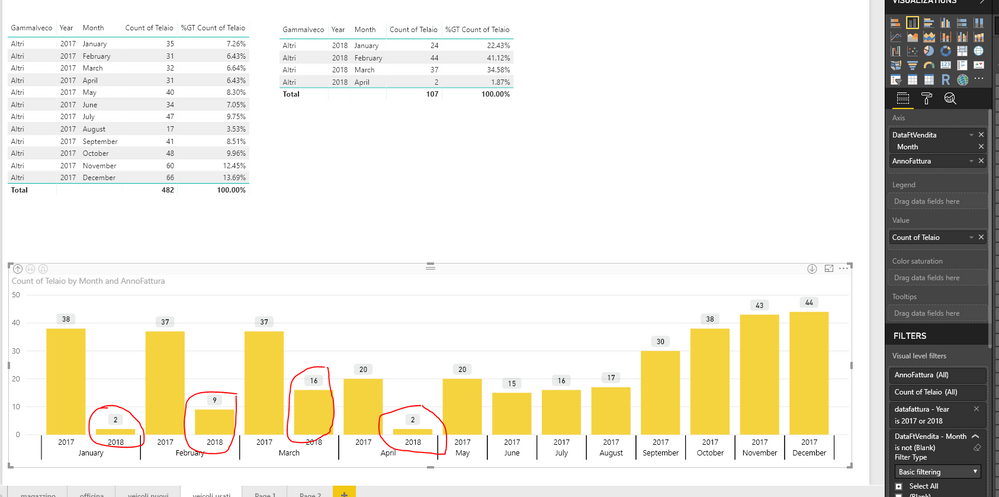
Hi guy. I need help. In the ghaph I'd have the bar of 2018 with a different colour of 2017. How Can I resolve? Thank you.


powerBi.PNG

1 ACCEPTED SOLUTION
ask4atish
Advocate III
Advocate III

You can use a trick here. Create a calculated column here as year=year(your date field) and use this calculated column (year) as legend. Then go to format pane and under data color assign color to 2017 and another color to 2018

View solution in original post

1 REPLY 1
ask4atish
Advocate III
Advocate III

You can use a trick here. Create a calculated column here as year=year(your date field) and use this calculated column (year) as legend. Then go to format pane and under data color assign color to 2017 and another color to 2018

Helpful resources

Announcements
Join our Fabric User Panel

Join our Fabric User Panel

Share feedback directly with Fabric product managers, participate in targeted research studies and influence the Fabric roadmap.

March Power BI Update Carousel

Power BI Community Update - March 2026

Check out the March 2026 Power BI update to learn about new features.