Join us at FabCon Atlanta from March 16 - 20, 2026, for the ultimate Fabric, Power BI, AI and SQL community-led event. Save $200 with code FABCOMM.
Register now!The Power BI Data Visualization World Championships is back! Get ahead of the game and start preparing now! Learn more
Hello guys,
I faced a problem while building new report. I have two queries - in one I have stored colleagues forecasts for different months of the year (specificaly for only one category - PTO) and in the other I am having their (weekly/daily/monthly) capacity. What I am trying to get is a count of how many days off they are taking each month based on their individual capacity - i.e.:
"If colleague's weekly capacity is 40 hrs and he is taking 16 hrs off in June I want it to show -> "2 days" in column June, and if other one is having 37.5 hrs weekly capacity and took 15 hrs off -> also "2 days" off".
I was trying to create DAX vlookup column in Forecasting query which is taking the capacity from Colleagues query:
"ColleagueDailyCapacity = LOOKUPVALUE(Colleagues[Daily_Capacity], Colleagues[ColleagueID], Forecast[Colleague_ID)"
to be able to create measure based on that in one query (something like "DaysOff = Forecast[June_2019]/Colleagues[Daily_Capacity]"), but it throws me blank rows...
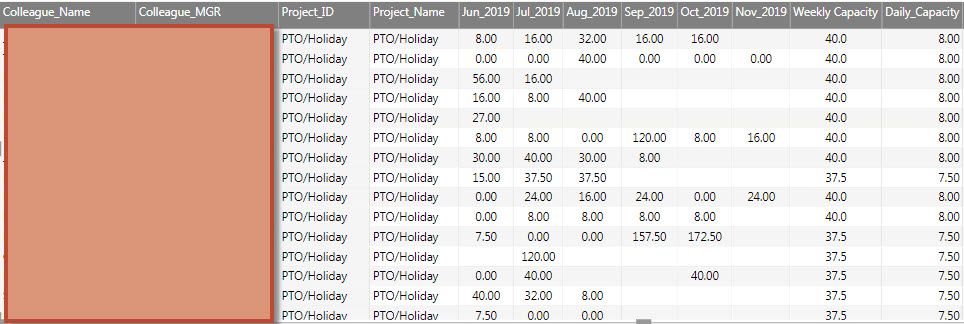
My forecast table looks like that (all month columns are coming from query and rest from the other):
What could be the proper way to do it?
Thanks in advance for all help!
Solved! Go to Solution.
Hi @Anonymous ,
To create relationship between tables and use RELATED function should work. Could you please share your sample data of your both tables to me so that I can have a test, f you don't have any confidential Information. Please upload your files to One Drive and share the link here.
Hi @Anonymous ,
To create relationship between tables and use RELATED function should work. Could you please share your sample data of your both tables to me so that I can have a test, f you don't have any confidential Information. Please upload your files to One Drive and share the link here.
Hello @v-frfei-msft ,
Yes, that's it! I totally forgot about existance of "related" function - it is really useful.
Case solved - thank you!
The Power BI Data Visualization World Championships is back! Get ahead of the game and start preparing now!
Check out the November 2025 Power BI update to learn about new features.
| User | Count |
|---|---|
| 59 | |
| 43 | |
| 42 | |
| 23 | |
| 17 |
| User | Count |
|---|---|
| 190 | |
| 122 | |
| 96 | |
| 66 | |
| 47 |