cancel
Showing results for 
Search instead for 
Did you mean: 

The Power BI Data Visualization World Championships is back! Get ahead of the game and start preparing now! Learn more

Reply
ING_BT
Helper I
Helper I

Cohort - Calculation Troubles - Calculate / Divide and MIN ?

Hello All, 


I'm using the Matrix visual in Power BI to create a "Cohort" analysis. 


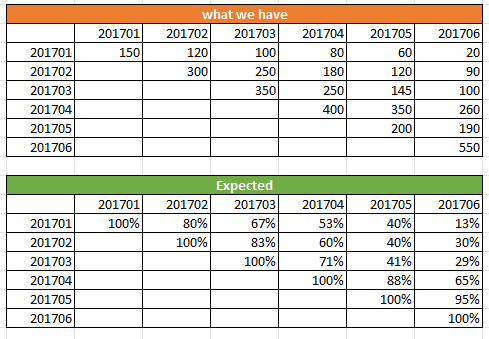
As you can see below, we have the date month of the first order (first column) and then by month how many customers stayed. 

The table is build in a was that we have no date intelligence. Thus I'm solely relying on min/max (but it doesn't work). 


In the expected result table, you can see that I want to :
Divide(
Calculate(sum(value)),
Filtered by ? To obtain the minimum of the row.


Exemple: 80/150=53% for 201704 on the row 201701


Screenshot_2.png

the "201701" are number and represent the year & month. 


Thank you in advance for your insights! 


Best,

BT

1 ACCEPTED SOLUTION
Anonymous
Not applicable

Hi @ING_BT , 

Please refer to my pbix file to see if it helps you.

Craete a measure.

Measure =
VAR _mindate =
    CALCULATE (
        MIN ( 'Table'[date 2] ),
        FILTER (
            ALL ( 'Table' ),
            'Table'[date] = SELECTEDVALUE ( 'Table'[date] )
                && 'Table'[value] <> BLANK ()
        )
    )
VAR mu_ =
    CALCULATE (
        MAX ( 'Table'[value] ),
        FILTER (
            ALL ( 'Table' ),
            'Table'[date] = SELECTEDVALUE ( 'Table'[date] )
                && 'Table'[date 2] = _mindate
        )
    )
VAR zi =
    MAX ( 'Table'[value] )
RETURN
    DIVIDE ( zi, mu_ )

vpollymsft_0-1649647533241.png

If I have misunderstood your meaning, please provide your pbix file without privacy information.


Best Regards

Community Support Team _ Polly


If this post helps, then please consider Accept it as the solution to help the other members find it more quickly.

View solution in original post

2 REPLIES 2
ING_BT
Helper I
Helper I

Hello Polly, 


Thank you for your solution, it helps on the information I've provided ! 
Unfortunatly, my data set is quite differente with several dimensions&filters; so I'm working on modifiying this first and adapte your approach. 


Thank you for your help!


Best,

BT


Anonymous
Not applicable

Hi @ING_BT , 

Please refer to my pbix file to see if it helps you.

Craete a measure.

Measure =
VAR _mindate =
    CALCULATE (
        MIN ( 'Table'[date 2] ),
        FILTER (
            ALL ( 'Table' ),
            'Table'[date] = SELECTEDVALUE ( 'Table'[date] )
                && 'Table'[value] <> BLANK ()
        )
    )
VAR mu_ =
    CALCULATE (
        MAX ( 'Table'[value] ),
        FILTER (
            ALL ( 'Table' ),
            'Table'[date] = SELECTEDVALUE ( 'Table'[date] )
                && 'Table'[date 2] = _mindate
        )
    )
VAR zi =
    MAX ( 'Table'[value] )
RETURN
    DIVIDE ( zi, mu_ )

vpollymsft_0-1649647533241.png

If I have misunderstood your meaning, please provide your pbix file without privacy information.


Best Regards

Community Support Team _ Polly


If this post helps, then please consider Accept it as the solution to help the other members find it more quickly.

Helpful resources

Announcements
Power BI DataViz World Championships

Power BI Dataviz World Championships

The Power BI Data Visualization World Championships is back! Get ahead of the game and start preparing now!

November Power BI Update Carousel

Power BI Monthly Update - November 2025

Check out the November 2025 Power BI update to learn about new features.

FabCon Atlanta 2026 carousel

FabCon Atlanta 2026

Join us at FabCon Atlanta, March 16-20, for the ultimate Fabric, Power BI, AI and SQL community-led event. Save $200 with code FABCOMM.