Join us at FabCon Atlanta from March 16 - 20, 2026, for the ultimate Fabric, Power BI, AI and SQL community-led event. Save $200 with code FABCOMM.
Register now!The Power BI Data Visualization World Championships is back! Get ahead of the game and start preparing now! Learn more
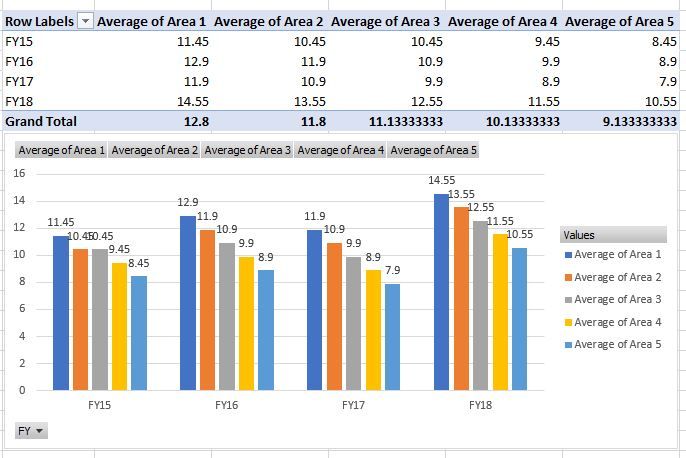
Hello Experts, I have a situation, and was hoping if you could help me. I have a table with FY, and a few area columns with the score. I then pivot it to have Area Avg by FY. Below is the screen shot of the table. I am trying to visualize this information using a "Clustered Column Chart" visual in powerBI, but then FY goes onto X Axis, where as I want FY as Legend. As you can see below, it is relatively easy to get this in MS Excel.
If you can guide me to any custom visual or way to achieve this in PowerBI, it would be very helpful to us. Please note that, I have already tried transforming the data by transposing Area Columns on Rows, but with that I am loosing so many other filter criterias. Its a part of a big fact table with multiple touchpoints/datasets. Having it as Columns is required.
Hi @Anonymous,
Can you share the original data please?
How about adding a calculated table as bellow?
middle_table =
SUMMARIZE (
'table1',
'table1'[FY],
'table1'[area],
"average_value", AVERAGE ( 'table1'[value] )
)Best Regards,
Dale
Hi Dale, thanks for your response, and sorry for the delayed reply. Creating a calculated table is not helpful. if we go with a calculated table, we loose the granular level filtering capabilites. This is the reason, why I could not go for transpose option. I will try to create a mockup dataset and share with you.
Thanks
Hello Experts, I have a situation, and was hoping if you could help me. I have a table with FY, and a few area columns with the score. I then pivot it to have Area Avg by FY. Below is the screen shot of the table. I am trying to visualize this information using a "Clustered Column Chart" visual in powerBI, but then FY goes onto X Axis, where as I want FY as Legend. As you can see below, it is relatively easy to get this in MS Excel.
If you can guide me to any custom visual or way to achieve this in PowerBI, it would be very helpful to us. Please note that, I have already tried transforming the data by transposing Area Columns on Rows, but with that I am loosing so many other filter criterias. Its a part of a big fact table with multiple touchpoints/datasets. Having it as Columns is required.
The Power BI Data Visualization World Championships is back! Get ahead of the game and start preparing now!
| User | Count |
|---|---|
| 41 | |
| 38 | |
| 36 | |
| 31 | |
| 28 |
| User | Count |
|---|---|
| 129 | |
| 88 | |
| 79 | |
| 68 | |
| 63 |