Join us at FabCon Atlanta from March 16 - 20, 2026, for the ultimate Fabric, Power BI, AI and SQL community-led event. Save $200 with code FABCOMM.
Register now!Get Fabric Certified for FREE during Fabric Data Days. Don't miss your chance! Request now
Requirement: Client Journey – Compare the client’s performance with number of registrations over the time broken down by WEEK1, WEEK2, WEEK3,…..etc.
Important Note: This comparison need to be done with same period of client with another client. (Comparison example: Week1 – FFor Client1 – From 6th Aug’16 To 12th Aug’16 vs. Week1 – For Client2 – From 3rd Feb 16 To 10th Feb 16)
Expected:
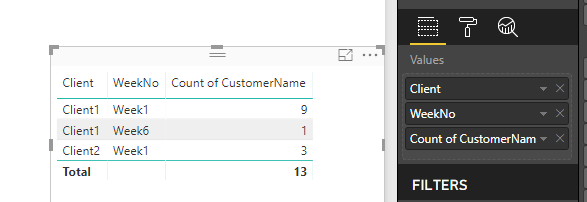
CLient1-Week1-CustomerCount-9
Client2-Week1-CustomerCount-3
Client CustomerName RegistrationDate
Client1 J.V.Rizzi 6-Aug-16
Client1 NickOtto 7-Aug-16
Client1 AllanS.Roth 8-Aug-16
Client1 LauraAlix 8-Aug-16
Client1 ElizabethDexheimer 9-Aug-16
Client1 RonGoldstein 10-Aug-16
Client1 DavidVoreacos 10-Aug-16
Client1 JenA.Miller 10-Aug-16
Client1 SulemanDin 12-Aug-16
Client2 RaeShanahan 3-Feb-16
Client2 ElliotM.Kass 4-Feb-16
Client2 MarkDupont 8-Feb-16
Solved! Go to Solution.
Hi @mahantesh1988,
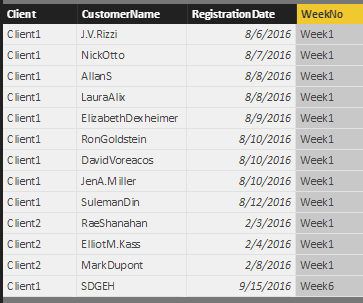
Create a calculated column:
WeekNo =
"Week"
& INT (
DATEDIFF (
CALCULATE (
MIN ( 'Client Table'[RegistrationDate] ),
ALLEXCEPT ( 'Client Table', 'Client Table'[Client] )
),
'Client Table'[RegistrationDate],
DAY
)
/ 7
)
+ 1
Use a table visual to host data.
Best regards,
Yuliana Gu
Thank You so much. It looks fine
Hi @mahantesh1988,
Create a calculated column:
WeekNo =
"Week"
& INT (
DATEDIFF (
CALCULATE (
MIN ( 'Client Table'[RegistrationDate] ),
ALLEXCEPT ( 'Client Table', 'Client Table'[Client] )
),
'Client Table'[RegistrationDate],
DAY
)
/ 7
)
+ 1
Use a table visual to host data.
Best regards,
Yuliana Gu
Check out the November 2025 Power BI update to learn about new features.
Advance your Data & AI career with 50 days of live learning, contests, hands-on challenges, study groups & certifications and more!