cancel
Showing results for 
Search instead for 
Did you mean: 

The Power BI Data Visualization World Championships is back! Get ahead of the game and start preparing now! Learn more

Reply
justlogmein
Helper III
Helper III

Clear Selections eraser missing from currency, number and date slicers

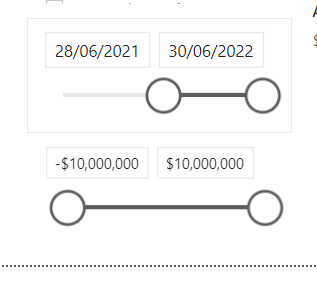
I want to be able to quickly clear ranges from my number and date slicers just like I can clear the selections from the category slicers. But I can't get the "Clear Selections" slicer to show, so I am stuck with manually having to enter random numbers into these fields i.e. -$1000000 and $1000000 for the number one to show all of the data. I just want to quickly reset this to the actual range of all the data.


justlogmein_0-1657419909406.png


1 ACCEPTED SOLUTION
MFelix
Super User
Super User

Hi  @justlogmein ,


Believe this is one of two issues:

  1. You have your date slicer on top of the currency slicer because of that you cannot see the header in this case you need to move the slicer date to behind the currency or change the size/position of the slicers
  2. The Slicer Header is turn off so it does not show on your visualization you need to turn it on to have the eraser to be visible.

Regards

Miguel Félix


Did I answer your question? Mark my post as a solution!

Proud to be a Super User!

Check out my blog: Power BI em Português


View solution in original post

2 REPLIES 2
Shubhabrata
Frequent Visitor

Perfect solution

MFelix
Super User
Super User

Hi  @justlogmein ,


Believe this is one of two issues:

  1. You have your date slicer on top of the currency slicer because of that you cannot see the header in this case you need to move the slicer date to behind the currency or change the size/position of the slicers
  2. The Slicer Header is turn off so it does not show on your visualization you need to turn it on to have the eraser to be visible.

Regards

Miguel Félix


Did I answer your question? Mark my post as a solution!

Proud to be a Super User!

Check out my blog: Power BI em Português


Helpful resources

Announcements
Power BI DataViz World Championships

Power BI Dataviz World Championships

The Power BI Data Visualization World Championships is back! Get ahead of the game and start preparing now!

November Power BI Update Carousel

Power BI Monthly Update - November 2025

Check out the November 2025 Power BI update to learn about new features.

FabCon Atlanta 2026 carousel

FabCon Atlanta 2026

Join us at FabCon Atlanta, March 16-20, for the ultimate Fabric, Power BI, AI and SQL community-led event. Save $200 with code FABCOMM.