cancel
Showing results for 
Search instead for 
Did you mean: 

The Power BI Data Visualization World Championships is back! Get ahead of the game and start preparing now! Learn more

Reply
Edisonsepulveda
New Member

Charting an Electrocardiogram from a single value

Hi All,


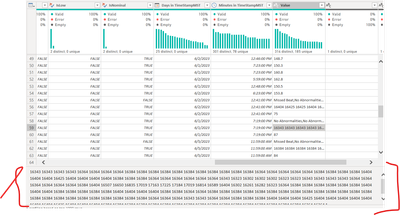
I'm trying to chart an Electrocardiogram from a  value that contains 2500 values separated by a space. My dataset looks like this:

Edisonsepulveda_0-1686035764995.png

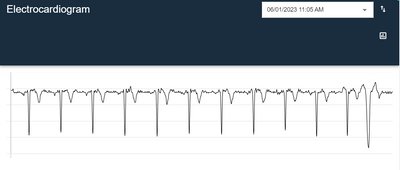
I'm trying to create a chart with the numbers in the cell and a fixed X-axis value (let's say 2,000). My chart should look like this:

Edisonsepulveda_1-1686035904223.png

I have tried using split.text and Generate series in DAX, but since this is medical data, I want to make sure that if for some reason one data point doesn't have 2,500 points, that I don't mess up the whole thing. What could be the best way to create this graph?


Thanks!

1 ACCEPTED SOLUTION
v-yanjiang-msft
Community Support
Community Support

Hi @Edisonsepulveda ,

According to your description, here's my solution.

Sample:

vyanjiangmsft_0-1686212193873.png

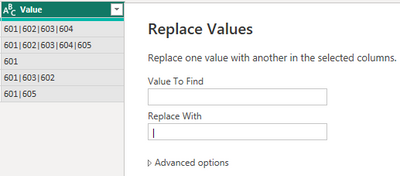
1. Replace value in Power Query. For the Value column, replace space to "|".

vyanjiangmsft_1-1686212253482.png

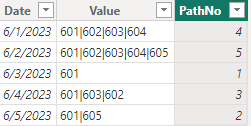
2.Create a calculated column.

PathNo =
PATHLENGTH ( [Value] )

vyanjiangmsft_2-1686212348749.png

3.Create a new table.

Table 2 =
GENERATESERIES ( 1, MAX ( 'Table'[PathNo] ), 1 )

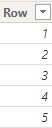
vyanjiangmsft_3-1686212450557.png

4.Create a measure.

Measure =
CONVERT (
    PATHITEM ( SELECTEDVALUE ( 'Table'[Value] ), MAX ( 'Table 2'[Row] ) ),
    INTEGER
)

Put Row column in X-axis and measure in Y-axis, get the correct result.

vyanjiangmsft_4-1686212549500.png

I attach my sample below for your reference.


Best Regards,
Community Support Team _ kalyj

If this post helps, then please consider Accept it as the solution to help the other members find it more quickly.

View solution in original post

2 REPLIES 2
v-yanjiang-msft
Community Support
Community Support

Hi @Edisonsepulveda ,

According to your description, here's my solution.

Sample:

vyanjiangmsft_0-1686212193873.png

1. Replace value in Power Query. For the Value column, replace space to "|".

vyanjiangmsft_1-1686212253482.png

2.Create a calculated column.

PathNo =
PATHLENGTH ( [Value] )

vyanjiangmsft_2-1686212348749.png

3.Create a new table.

Table 2 =
GENERATESERIES ( 1, MAX ( 'Table'[PathNo] ), 1 )

vyanjiangmsft_3-1686212450557.png

4.Create a measure.

Measure =
CONVERT (
    PATHITEM ( SELECTEDVALUE ( 'Table'[Value] ), MAX ( 'Table 2'[Row] ) ),
    INTEGER
)

Put Row column in X-axis and measure in Y-axis, get the correct result.

vyanjiangmsft_4-1686212549500.png

I attach my sample below for your reference.


Best Regards,
Community Support Team _ kalyj

If this post helps, then please consider Accept it as the solution to help the other members find it more quickly.

Thank you


Helpful resources

Announcements
Power BI DataViz World Championships

Power BI Dataviz World Championships

The Power BI Data Visualization World Championships is back! Get ahead of the game and start preparing now!

December 2025 Power BI Update Carousel

Power BI Monthly Update - December 2025

Check out the December 2025 Power BI Holiday Recap!

FabCon Atlanta 2026 carousel

FabCon Atlanta 2026

Join us at FabCon Atlanta, March 16-20, for the ultimate Fabric, Power BI, AI and SQL community-led event. Save $200 with code FABCOMM.