Share feedback directly with Fabric product managers, participate in targeted research studies and influence the Fabric roadmap.
Sign up nowGet Fabric certified for FREE! Don't miss your chance! Learn more
Hello guys,
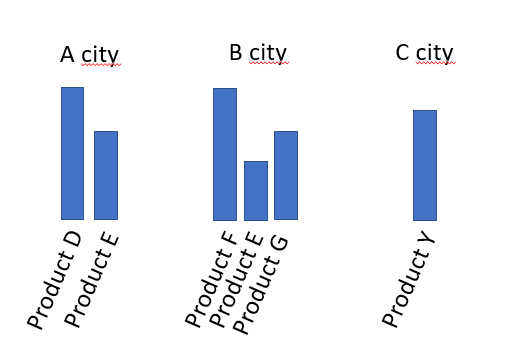
I tried to develop custom visual with Charticulator and I'm stuck. I want graphic like this:
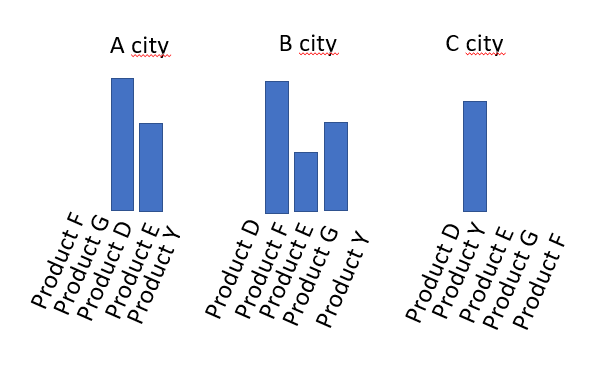
Actually I added nested chart but in my chart charticulator doesn't show products according to the city it is connected to. It shows all product with null values. Like this:
I dont know how to filter product according to citys. Could you help me?
Solved! Go to Solution.
Charticulator shares the categorical scale values across all nested charts and it is not possible to make them independent currently. There's an issue tracking this behaviour here.
Regards,
Daniel
Proud to be a Super User!
On how to ask a technical question, if you really want an answer (courtesy of SQLBI)
Hi @Brnwalker
I have no experience in developing a custom visual. I believe some people in Custom Visuals Development Discussion forum may have an idea about it.
Could you help look into this thread if you have any time? Thank you very much!
Best Regards,
Community Support Team _ Jing
Charticulator shares the categorical scale values across all nested charts and it is not possible to make them independent currently. There's an issue tracking this behaviour here.
Regards,
Daniel
Proud to be a Super User!
On how to ask a technical question, if you really want an answer (courtesy of SQLBI)
If you love stickers, then you will definitely want to check out our Community Sticker Challenge!
Check out the January 2026 Power BI update to learn about new features.
| User | Count |
|---|---|
| 63 | |
| 58 | |
| 46 | |
| 21 | |
| 18 |
| User | Count |
|---|---|
| 119 | |
| 116 | |
| 37 | |
| 34 | |
| 30 |