cancel
Showing results for 
Search instead for 
Did you mean: 

Get Fabric Certified for FREE during Fabric Data Days. Don't miss your chance! Request now

Reply
Anonymous
Not applicable

Chart to display value from year beginning to till the slicer selection month

Hi All,

Having chart with Month name awith values and slicer with Month Name (January to December).

I need to show chart value from January to May if the slicer selection is May or January to August If the slicer selection is August or any month  selection in slicer the chart should show values from January to the selection month in slicer.

Can anyone help me. 


Thanks in advance

Regards,

Murali.

1 ACCEPTED SOLUTION
v-juanli-msft
Community Support
Community Support

Hi @Anonymous 

If you want to show values before and on the selected month of the current year,

You could create a new table

monthname list =
FILTER (
    ADDCOLUMNS (
        CALENDARAUTO (),
        "monthno", FORMAT ( [Date], "mm" ),
        "monthname", FORMAT ( [Date], "mmmm" )
    ),
    DAY ( [Date] ) = 1
)

Create a measure and add it to visual level filter

Measure =
VAR selected_m =
    SELECTEDVALUE ( 'monthname list'[Date] )
RETURN
    IF (
        MONTH ( MAX ( 'Table'[date] ) ) <= MONTH ( selected_m )
            && YEAR ( MAX ( 'Table'[date] ) ) = YEAR ( TODAY () ),
        1,
        0
    )
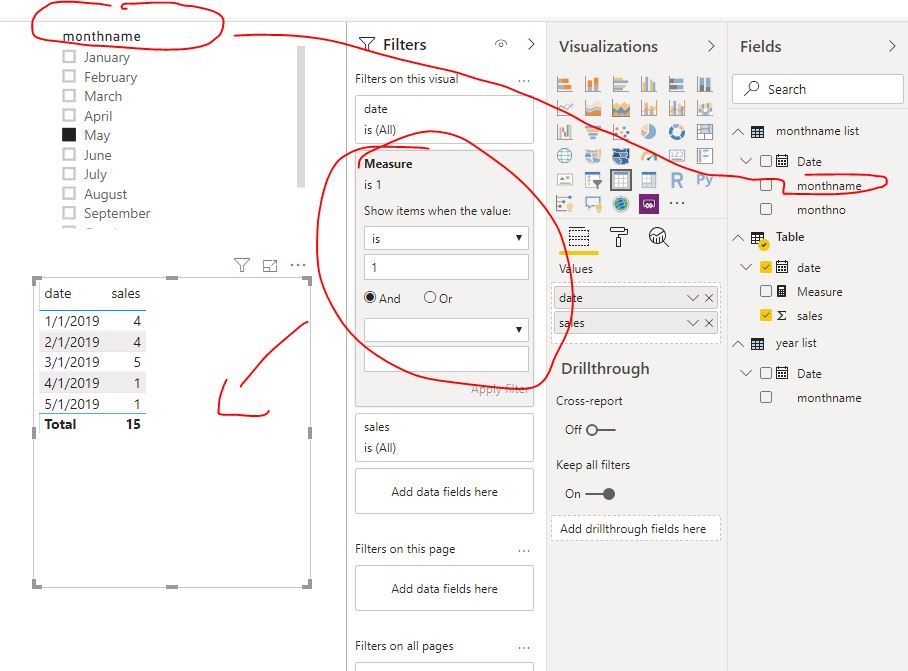
Capture2.JPG

If you want to show selected year's data, you could create another table,

year list = FILTER(ADDCOLUMNS(CALENDARAUTO(),"yearname",YEAR([Date])),DAY([Date])=1)

Create another measure

Measure 2 =
VAR selected_m =
    SELECTEDVALUE ( 'monthname list'[Date] )
VAR selected_y =
    SELECTEDVALUE ( 'year list'[yearname] )
RETURN
    IF (
        MONTH ( MAX ( 'Table'[date] ) ) <= MONTH ( selected_m )
            && YEAR ( MAX ( 'Table'[date] ) ) = selected_y,
        1,
        0
    )
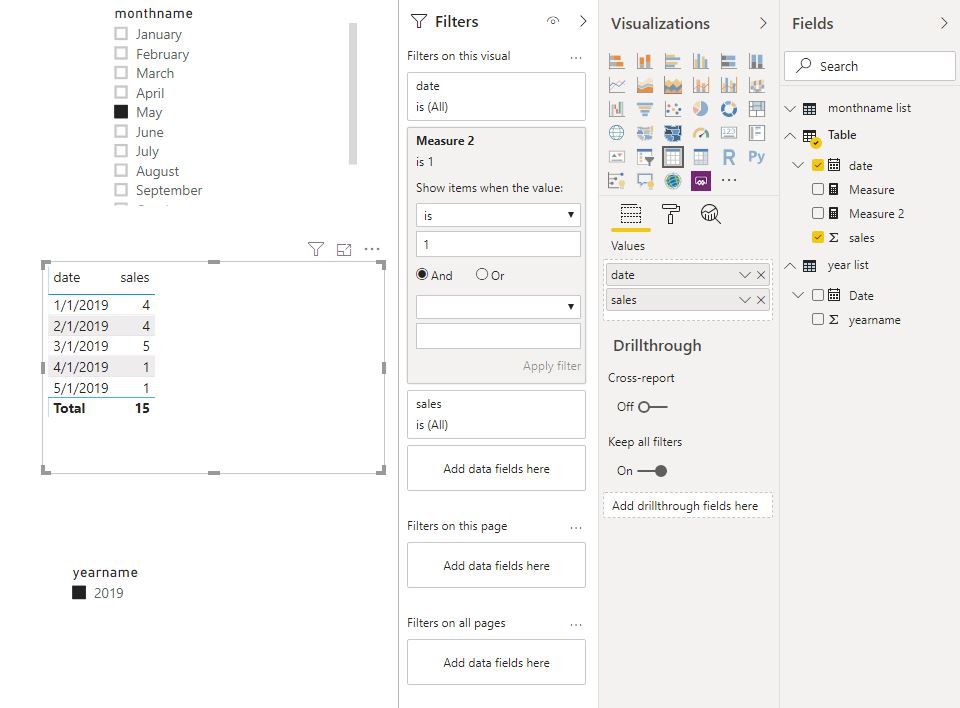
Capture3.JPG

Best Regards
Maggie
Community Support Team _ Maggie Li
If this post helps, then please consider Accept it as the solution to help the other members find it more quickly.

View solution in original post

2 REPLIES 2
v-juanli-msft
Community Support
Community Support

Hi @Anonymous 

If you want to show values before and on the selected month of the current year,

You could create a new table

monthname list =
FILTER (
    ADDCOLUMNS (
        CALENDARAUTO (),
        "monthno", FORMAT ( [Date], "mm" ),
        "monthname", FORMAT ( [Date], "mmmm" )
    ),
    DAY ( [Date] ) = 1
)

Create a measure and add it to visual level filter

Measure =
VAR selected_m =
    SELECTEDVALUE ( 'monthname list'[Date] )
RETURN
    IF (
        MONTH ( MAX ( 'Table'[date] ) ) <= MONTH ( selected_m )
            && YEAR ( MAX ( 'Table'[date] ) ) = YEAR ( TODAY () ),
        1,
        0
    )

Capture2.JPG

If you want to show selected year's data, you could create another table,

year list = FILTER(ADDCOLUMNS(CALENDARAUTO(),"yearname",YEAR([Date])),DAY([Date])=1)

Create another measure

Measure 2 =
VAR selected_m =
    SELECTEDVALUE ( 'monthname list'[Date] )
VAR selected_y =
    SELECTEDVALUE ( 'year list'[yearname] )
RETURN
    IF (
        MONTH ( MAX ( 'Table'[date] ) ) <= MONTH ( selected_m )
            && YEAR ( MAX ( 'Table'[date] ) ) = selected_y,
        1,
        0
    )

Capture3.JPG

Best Regards
Maggie
Community Support Team _ Maggie Li
If this post helps, then please consider Accept it as the solution to help the other members find it more quickly.

amitchandak
Super User
Super User

There are a few ways. One is you can use ytd formula. second in the filter tab drag the date and from relative/advance option choose this year.


Year Sales = CALCULATE(SUM(Sales[Sales Amount]),DATESYTD('Date'[Date]))


Appreciate your Kudos. In case, this is the solution you are looking for, mark it as the Solution. In case it does not help, please provide additional information and mark me with @
Thanks.

My Recent Blog - https://community.powerbi.com/t5/Community-Blog/Comparing-Data-Across-Date-Ranges/ba-p/823601

Share with Power BI Enthusiasts: Full Power BI Video (20 Hours) YouTube
Microsoft Fabric Series 60+ Videos YouTube
Microsoft Fabric Hindi End to End YouTube

Helpful resources

Announcements
November Power BI Update Carousel

Power BI Monthly Update - November 2025

Check out the November 2025 Power BI update to learn about new features.

Fabric Data Days Carousel

Fabric Data Days

Advance your Data & AI career with 50 days of live learning, contests, hands-on challenges, study groups & certifications and more!

FabCon Atlanta 2026 carousel

FabCon Atlanta 2026

Join us at FabCon Atlanta, March 16-20, for the ultimate Fabric, Power BI, AI and SQL community-led event. Save $200 with code FABCOMM.

Top Solution Authors
Top Kudoed Authors