Get Fabric or SQL Certified for Free.
Get certified for free when you join Fabric Data Days 2026 and dive into Fabric, Power BI, SQL, AI, and other essential data skills.
Join now- Power BI forums
- Get Help with Power BI
- Desktop
- Service
- Report Server
- Power Query
- Mobile Apps
- Developer
- DAX Commands and Tips
- Custom Visuals Development Discussion
- Health and Life Sciences
- Power BI Spanish forums
- Translated Spanish Desktop
- Training and Consulting
- Instructor Led Training
- Dashboard in a Day for Women, by Women
- Galleries
- Data Stories Gallery
- Themes Gallery
- Contests Gallery
- QuickViz Gallery
- Quick Measures Gallery
- Visual Calculations Gallery
- Fabric Apps Gallery
- Notebook Gallery
- Translytical Task Flow Gallery
- TMDL Gallery
- R Script Showcase
- Webinars and Video Gallery
- Ideas
- Custom Visuals Ideas (read-only)
- Issues
- Issues
- Events
- Upcoming Events
July 7 - July 17 | Round 2 of the Power BI Dataviz World Championships. Don't miss your chance! Learn more
- Power BI forums
- Forums
- Get Help with Power BI
- Desktop
- Chart Filter Using a Variable?
- Subscribe to RSS Feed
- Mark Topic as New
- Mark Topic as Read
- Float this Topic for Current User
- Bookmark
- Subscribe
- Printer Friendly Page


- Mark as New
- Bookmark
- Subscribe
- Mute
- Subscribe to RSS Feed
- Permalink
- Report Inappropriate Content
Chart Filter Using a Variable?
Hello,
I'm wondering for chart filter, is it possible to use a variable? Right now, I have to hard-code a number.
Appreciated!
Solved! Go to Solution.


- Mark as New
- Bookmark
- Subscribe
- Mute
- Subscribe to RSS Feed
- Permalink
- Report Inappropriate Content
ok, now i understand. I was able to do this in excel 2013 with the old power query and powerpivot where by you fiddled with a piece of M code and could write back a variable from the spreadsheet into the datamodel. I will try and track it down but have had no luck so far. I bet you can still do it in powerbi given that its all the same - it will involve passing back value from an unrelated table. Sorry i dont have a solution at hand.

- Mark as New
- Bookmark
- Subscribe
- Mute
- Subscribe to RSS Feed
- Permalink
- Report Inappropriate Content
Have you found a solution? I'm struggling with the same problem. I managed to use a parameter to filter measures displayed in cards but not charts


- Mark as New
- Bookmark
- Subscribe
- Mute
- Subscribe to RSS Feed
- Permalink
- Report Inappropriate Content
@captainlaw On top of what @samdthompson requested, i am guessing you're referring to paramter that can be passed to filter in a report. If yes then in power bi service you can't access parameters that you create in power bi desktop yet but there is a way to programatically pass filter values to a report in power bi.
Report URL looks like
https://app.powerbi.com/groups/me/reports/7fe9a5d0-adff-4e98-bad0-dd77d64ce836/ReportSection
You can specify filter values to report url as described in this post.
- Mark as New
- Bookmark
- Subscribe
- Mute
- Subscribe to RSS Feed
- Permalink
- Report Inappropriate Content
Hello Ankit,
I'm actually trying to accomplish parameter/variable in desktop not the service. Is that possible? If so, is there a blog describing how to accomplish that?
Appreciated!
- Mark as New
- Bookmark
- Subscribe
- Mute
- Subscribe to RSS Feed
- Permalink
- Report Inappropriate Content
Assuming that you are wanting a static > 5 for example, can you do something like this.... =calculate([measure],filter(table,table[measure]>5)). Is that what you are looking for?
- Mark as New
- Bookmark
- Subscribe
- Mute
- Subscribe to RSS Feed
- Permalink
- Report Inappropriate Content
Dynamic filtering is what I'm looking for.
I don't think the dropdown filter selection box allows me to enter code. Let me know if my assumption is incorrect.
- Mark as New
- Bookmark
- Subscribe
- Mute
- Subscribe to RSS Feed
- Permalink
- Report Inappropriate Content
I also tried Parameter, but with no avail.
- Mark as New
- Bookmark
- Subscribe
- Mute
- Subscribe to RSS Feed
- Permalink
- Report Inappropriate Content
Its a measure to write. Go to modelling on the menu and then to new measure. If LAWRank is not a defined measure already it might need to be something like:
=calculate(sum[table[LAWrank],filter(table,table[measure]>5))
- Mark as New
- Bookmark
- Subscribe
- Mute
- Subscribe to RSS Feed
- Permalink
- Report Inappropriate Content
The goal is to make it dynamic so without hardcoding but allow user selection.
- Mark as New
- Bookmark
- Subscribe
- Mute
- Subscribe to RSS Feed
- Permalink
- Report Inappropriate Content
ok, now i understand. I was able to do this in excel 2013 with the old power query and powerpivot where by you fiddled with a piece of M code and could write back a variable from the spreadsheet into the datamodel. I will try and track it down but have had no luck so far. I bet you can still do it in powerbi given that its all the same - it will involve passing back value from an unrelated table. Sorry i dont have a solution at hand.
- Mark as New
- Bookmark
- Subscribe
- Mute
- Subscribe to RSS Feed
- Permalink
- Report Inappropriate Content
How is this dynamic?
- Mark as New
- Bookmark
- Subscribe
- Mute
- Subscribe to RSS Feed
- Permalink
- Report Inappropriate Content
Hi can you please explain a little more on what you mean by filtering with a variable and where you hard code anything.
- Mark as New
- Bookmark
- Subscribe
- Mute
- Subscribe to RSS Feed
- Permalink
- Report Inappropriate Content
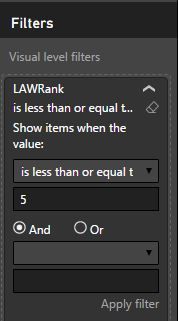
Yes. I've attached a screenshot of the chart filter. I hard-coded the field to only <= 5 Would love to apply variable to replace 5.

Helpful resources

FabCon & SQLCon – Barcelona 2026
Join us in Barcelona for FabCon and SQLCon, the Fabric, Power BI, SQL, and AI community event. Save €200 with code FABCMTY200.

Data Days 2026
Join Data Days 2026: 60 days of free live/on-demand sessions, challenges, study groups, and certification opportunities.

Power BI DataViz World Championships - June 2026
A new Power BI DataViz World Championship is coming this June! Don't miss out on submitting your entry.

| User | Count |
|---|---|
| 30 | |
| 28 | |
| 26 | |
| 23 | |
| 17 |


| User | Count |
|---|---|
| 57 | |
| 41 | |
| 31 | |
| 24 | |
| 20 |


