Join us at FabCon Atlanta from March 16 - 20, 2026, for the ultimate Fabric, Power BI, AI and SQL community-led event. Save $200 with code FABCOMM.
Register now!View all the Fabric Data Days sessions on demand. View schedule
Hi,
Someone please help!
We have an monthly tracker dashboard which is connected to SQL server database in Import mode. Currently because of new organisation policy, the client says that he can send the data only in excel format. Is there a way to replace the connection from SQL server to Excel/CSV. The data is not a huge one.
Solved! Go to Solution.
@Anonymous , Thi can be a bit tricky.
You need to create a new connection in a new file. Open Edit Transform data/Edit Query, Right-click on the table and open advance editor and take connection script
You can use the script above and replace in exiting file in the advance source
refer
https://www.c-sharpcorner.com/article/how-to-change-data-source-of-existing-report-in-power-bi/
Hi @Anonymous ,
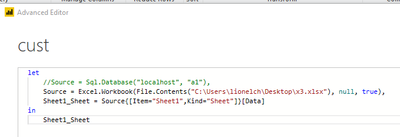
If the tables and columns of the two data sources are the same, it really makes sense to do so, otherwise it makes no sense.
Best regards,
Lionel Chen
If this post helps, then please consider Accept it as the solution to help the other members find it more quickly.
@Anonymous - You need to used Advanced Editor to change out the Source and probably Navigation steps of your Power Query. If you can post your Advanced Editor code here from your original query as well as the Advanced Editor code from creating a brand new query to your Excel/CSV, I can do the magic for you if you @ me in a response. I just recently helped @Anonymous with a similar situation going from a CSV to a Dataflow I think.
Otherwise, you are going to have to compare the Source and Navigation steps (first two steps) in Advanced Editor and figure out what to replace in your original query with the steps in your new query.
@Anonymous , Thi can be a bit tricky.
You need to create a new connection in a new file. Open Edit Transform data/Edit Query, Right-click on the table and open advance editor and take connection script
You can use the script above and replace in exiting file in the advance source
refer
https://www.c-sharpcorner.com/article/how-to-change-data-source-of-existing-report-in-power-bi/
Check out the November 2025 Power BI update to learn about new features.
Advance your Data & AI career with 50 days of live learning, contests, hands-on challenges, study groups & certifications and more!