cancel
Showing results for 
Search instead for 
Did you mean: 

The Power BI Data Visualization World Championships is back! It's time to submit your entry. Live now!

Reply
lastnn30
Post Patron
Post Patron

Changing the font size of a column in Matrix

Hi

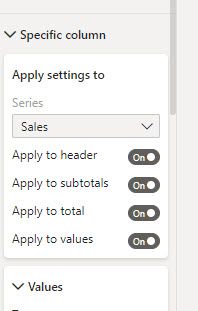
I created the matrix below. I went to Format -->Value and I changed the size of the text but to my suprise SalesPerson names did not change. I do not see where I can change that. I have Format-->Specific column but when I went there, I see Sales box and it grayed out. Thank you very much.


SNAG-0533.jpgSNAG-0532.jpg

1 ACCEPTED SOLUTION
amitchandak
Super User
Super User

@lastnn30 , Check Row Headers.

Share with Power BI Enthusiasts: Full Power BI Video (20 Hours) YouTube
Microsoft Fabric Series 60+ Videos YouTube
Microsoft Fabric Hindi End to End YouTube

View solution in original post

2 REPLIES 2
lastnn30
Post Patron
Post Patron

Yes 🙂 Thank you very much.

amitchandak
Super User
Super User

@lastnn30 , Check Row Headers.

Share with Power BI Enthusiasts: Full Power BI Video (20 Hours) YouTube
Microsoft Fabric Series 60+ Videos YouTube
Microsoft Fabric Hindi End to End YouTube

Helpful resources

Announcements
Power BI DataViz World Championships

Power BI Dataviz World Championships

The Power BI Data Visualization World Championships is back! It's time to submit your entry.

January Power BI Update Carousel

Power BI Monthly Update - January 2026

Check out the January 2026 Power BI update to learn about new features.

FabCon Atlanta 2026 carousel

FabCon Atlanta 2026

Join us at FabCon Atlanta, March 16-20, for the ultimate Fabric, Power BI, AI and SQL community-led event. Save $200 with code FABCOMM.