Join us at FabCon Atlanta from March 16 - 20, 2026, for the ultimate Fabric, Power BI, AI and SQL community-led event. Save $200 with code FABCOMM.
Register now!The Power BI Data Visualization World Championships is back! Get ahead of the game and start preparing now! Learn more
Hello! I have a line graph that shows sales and can be filtered by Country, State, and City. I have created one filter than can filter first by Country, then by State, and then by City.
image 1:
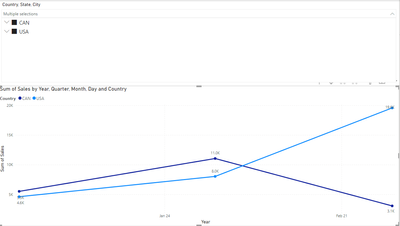
My line graph has the following filters:
image 2:
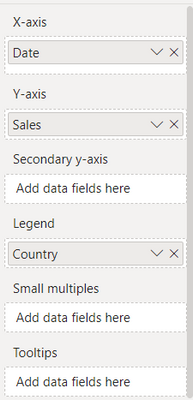
These are the filters being used on the slicer for my line graph:
image 3:
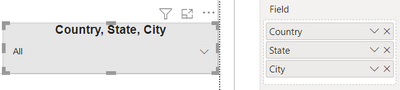
The way it works now is, if i select a countries or multiple countries, I can see the sales for multiple countries at a time and it will show the results on different lines. This works as it should (see first image).
Now, let us say I click the drop down on Canada and select Quebec and Ontario, the graph combines the sales for the 2 states/provinces and shows them one line (see image 4). How can I get Quebec and Ontario on separate lines and have the legend reflect Quebec and Ontario instead of it showing Canada still?
Image 4:
Essentially, when I select just countries I would like the legend to show the countries, when I select states, I want to see the states, and when I select the cities I want the legend to show the cities.
The other thing that is happening is, lets say I select AZ from USA and Quebec from Canada. The graph will show me the results for these two states/provinces but the legend will continue to say USA and Canada instead of AZ and Quebec (see image 5).
image 5:
Any tips would be appreciated!
Solved! Go to Solution.
Hey @allora ,
you can achieve what you are looking for by using the Field parameters feature: Let report readers use field parameters to change visuals (preview) - Power BI | Microsoft Learn
But at the current moment, it is a bit tricky to "simulate" the hierarchy. Maybe you can adapt the solution posted by @otravers here: Field Parameter - Hierarchy - Microsoft Power BI Community
Hopefully, this provides an idea of how to tackle your challenge.
Regards,
Tom
Hey @allora ,
you can achieve what you are looking for by using the Field parameters feature: Let report readers use field parameters to change visuals (preview) - Power BI | Microsoft Learn
But at the current moment, it is a bit tricky to "simulate" the hierarchy. Maybe you can adapt the solution posted by @otravers here: Field Parameter - Hierarchy - Microsoft Power BI Community
Hopefully, this provides an idea of how to tackle your challenge.
Regards,
Tom
Check out the November 2025 Power BI update to learn about new features.
Advance your Data & AI career with 50 days of live learning, contests, hands-on challenges, study groups & certifications and more!