cancel
Showing results for 
Search instead for 
Did you mean: 

Vote for your favorite vizzies from the Power BI Dataviz World Championship submissions. Vote now!

Reply
slyfox
Helper II
Helper II

Changes count

Hi there,

Have a table with product to produce information

basing on columns 'Start Prod Date', 'Product to Produce' and 'Type' I need to create columns 'Changes' and 'Number of Times' 


Start Prod DateProductToProduceTypeChangesNumber Of Times
01-02-18Chocolate AA  
01-02-18Chocolate AAAB1
01-02-18Chocolate BB  
01-02-18Chocolate BBBA1
05-02-18Chocolate AAAC1
05-02-18Chocolate CC  
09-02-18Chocolate CCCB1
09-02-18Chocolate BBBA1
09-02-18Chocolate AA  


1 ACCEPTED SOLUTION
Anonymous
Not applicable

@slyfox,

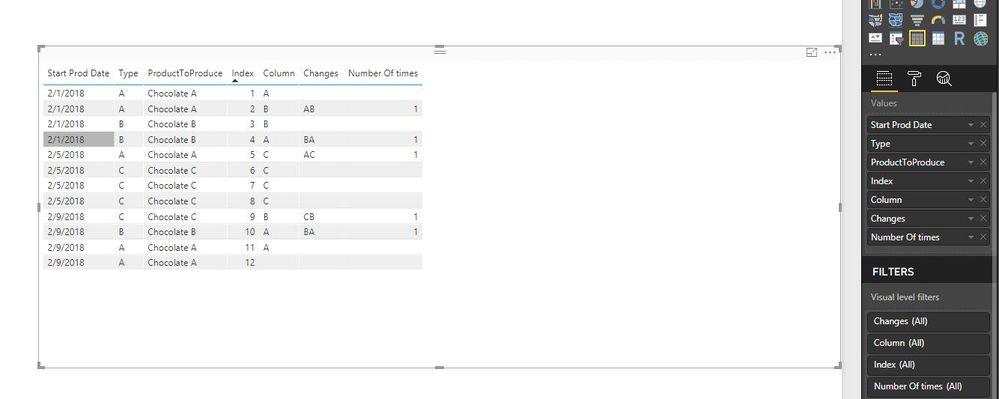
Add an index column in your table in Query Editor of Power BI Desktop.

Then create the following columns in your table.

Column = CALCULATE(FIRSTNONBLANK(Table[Type],1),FILTER(Table,Table[Index]=EARLIER(Table[Index])+1))
Changes = IF(Table[Type]=Table[Column] || ISBLANK(Table[Column]),BLANK(),CONCATENATE(Table[Type],Table[Column]))
Number Of times = CALCULATE(COUNTA(Table[Changes]),ALLSELECTED(Table[Index]))

1.JPG


Regards,
Lydia

View solution in original post

1 REPLY 1
Anonymous
Not applicable

@slyfox,

Add an index column in your table in Query Editor of Power BI Desktop.

Then create the following columns in your table.

Column = CALCULATE(FIRSTNONBLANK(Table[Type],1),FILTER(Table,Table[Index]=EARLIER(Table[Index])+1))
Changes = IF(Table[Type]=Table[Column] || ISBLANK(Table[Column]),BLANK(),CONCATENATE(Table[Type],Table[Column]))
Number Of times = CALCULATE(COUNTA(Table[Changes]),ALLSELECTED(Table[Index]))

1.JPG


Regards,
Lydia

Helpful resources

Announcements
Power BI DataViz World Championships

Power BI Dataviz World Championships

Vote for your favorite vizzies from the Power BI World Championship submissions!

Sticker Challenge 2026 Carousel

Join our Community Sticker Challenge 2026

If you love stickers, then you will definitely want to check out our Community Sticker Challenge!

January Power BI Update Carousel

Power BI Monthly Update - January 2026

Check out the January 2026 Power BI update to learn about new features.

FabCon Atlanta 2026 carousel

FabCon Atlanta 2026

Join us at FabCon Atlanta, March 16-20, for the ultimate Fabric, Power BI, AI and SQL community-led event. Save $200 with code FABCOMM.