Don't miss your chance to take the Fabric Data Engineer (DP-600) exam for FREE! Find out how by attending the DP-600 session on April 23rd (pacific time), live or on-demand.
Learn moreNext up in the FabCon + SQLCon recap series: The roadmap for Microsoft SQL and Maximizing Developer experiences in Fabric. All sessions are available on-demand after the live show. Register now
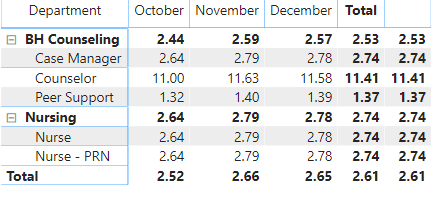
I have a matrix and inorder to get the values I wanted, i needed to create a measure that was using an "Average" expression. When i look at this from a line item point of view, the values i was looking for are correct, but the subtotals and grand totals are averages, and i would need them to be summed. Is there a way to do this, or am i going to need to change up my meausre? thanks
Solved! Go to Solution.
When you make a measure and add it to a table the measure is calculated in all row including the total, so you need to add a summarization formula in order to have the correct calculation on your total.
Add the following measure and put it on your table:
Total_Row = IF ( HASONEVALUE ( Table[Department] ); [Total], SUMX ( Table; [Total] ) )
Thanks & regards,
Pravin Wattamwar
www.linkedin.com/in/pravin-p-wattamwar
If I resolve your problem Mark it as a solution and give kudos.
When you make a measure and add it to a table the measure is calculated in all row including the total, so you need to add a summarization formula in order to have the correct calculation on your total.
Add the following measure and put it on your table:
Total_Row = IF ( HASONEVALUE ( Table[Department] ); [Total], SUMX ( Table; [Total] ) )
Thanks & regards,
Pravin Wattamwar
www.linkedin.com/in/pravin-p-wattamwar
If I resolve your problem Mark it as a solution and give kudos.
check this link for your referance
https://community.powerbi.com/t5/Desktop/Incorrect-Measure-Total/td-p/454679
Thanks & regards,
Pravin Wattamwar
www.linkedin.com/in/pravin-p-wattamwar
If I resolve your problem Mark it as a solution and give kudos.
If you have recently started exploring Fabric, we'd love to hear how it's going. Your feedback can help with product improvements.
A new Power BI DataViz World Championship is coming this June! Don't miss out on submitting your entry.
Share feedback directly with Fabric product managers, participate in targeted research studies and influence the Fabric roadmap.
| User | Count |
|---|---|
| 48 | |
| 45 | |
| 41 | |
| 20 | |
| 17 |
| User | Count |
|---|---|
| 69 | |
| 63 | |
| 32 | |
| 31 | |
| 25 |