
cancel
Showing results for 
Search instead for 
Did you mean: 

The Power BI Data Visualization World Championships is back! Get ahead of the game and start preparing now! Learn more

Reply
Anonymous
Not applicable

Change data Source from File to Folder

Dear expert


I have one huge excel file in one power bi report, due to this report is covered sales from 2019 until current date, everyday when i run this report, it take very long time to uploaded. How can i section this excel report into 2019, 2020 ,2021 and saved into one folder without change any setting on the existing Power BI report and reduce the uploading time?


Please advise.


Thank you


Maggie


1 ACCEPTED SOLUTION

@Anonymous , Please find the file I tried. Sales was CSV , the text was the folder.The file is attached after signatures

cvs code in inside the comment /* */

Share with Power BI Enthusiasts: Full Power BI Video (20 Hours) YouTube
Microsoft Fabric Series 60+ Videos YouTube
Microsoft Fabric Hindi End to End YouTube

View solution in original post

5 REPLIES 5
Syndicate_Admin
Administrator
Administrator

Hello

I have a similar problem: when changing the path of data that is loaded into PBI, the error "Items blocked by errors with other queries are loading" comes out. I appreciate indications in this regard,

Best regards,

v-robertq-msft
Community Support
Community Support

Hi, @Anonymous 

Have amitchandak’s reply helped you to solve the problem?

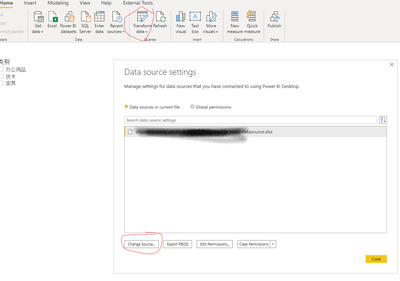
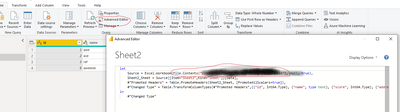
To change the original data source to replace it with a new file or folder, there are two ways to in Power BI desktop:

  1. Go to Transform data-> data source setting, change the source of data:

v-robertq-msft_0-1612949280846.png


  1. Go to the power query editor, advanced editor, replace the file path to change the data source manually:

v-robertq-msft_1-1612949280857.png


Before updating your data source, you should first check if the column name and data type are the same as the columns in the original Excel file. If not, you will get an error.

Then you should update the reference of the next steps according to your actual situation.


Best Regards,

Community Support Team _Robert Qin

If this post helps, then please consider Accept it as the solution to help the other members find it more quickly.

amitchandak
Super User
Super User

@Anonymous , Would be a bit difficult. Create the folder source in anew source. Get the code from

Home Tab -> Transform Data ->Transform Data -> Right click on Table -> Open Advance Editor and take the top part of the code and place it in place of the old connection code.


keep back up of file


refer this video - https://www.youtube.com/watch?v=59PUFuuCrbY

Share with Power BI Enthusiasts: Full Power BI Video (20 Hours) YouTube
Microsoft Fabric Series 60+ Videos YouTube
Microsoft Fabric Hindi End to End YouTube
Anonymous
Not applicable

I follow your instruction but it won't allow me to do it. The pop out screen as below:


Please advise.

Capture 3.PNG

Thank you


Maggie

@Anonymous , Please find the file I tried. Sales was CSV , the text was the folder.The file is attached after signatures

cvs code in inside the comment /* */

Share with Power BI Enthusiasts: Full Power BI Video (20 Hours) YouTube
Microsoft Fabric Series 60+ Videos YouTube
Microsoft Fabric Hindi End to End YouTube

Helpful resources

Announcements
Power BI DataViz World Championships

Power BI Dataviz World Championships

The Power BI Data Visualization World Championships is back! Get ahead of the game and start preparing now!

December 2025 Power BI Update Carousel

Power BI Monthly Update - December 2025

Check out the December 2025 Power BI Holiday Recap!

FabCon Atlanta 2026 carousel

FabCon Atlanta 2026

Join us at FabCon Atlanta, March 16-20, for the ultimate Fabric, Power BI, AI and SQL community-led event. Save $200 with code FABCOMM.

Top Solution Authors