Forum Discussion

Change Sql Connection
Hi,
I Power Bi Stat and I use a Source Connection with some table.
Now I need use my stat with other Sql Server (but table structure are the same).
Ho I can connect my stat to new Sql Server?
I try to change Connection, but table point to old server.
Thanks
Hi Amerilin,
Once you build a connection (aka "Query"), you can go to the queries editor by hitting the "Edit Queries" button in the ribbon, then you'll see that query with a list of operations that you did.
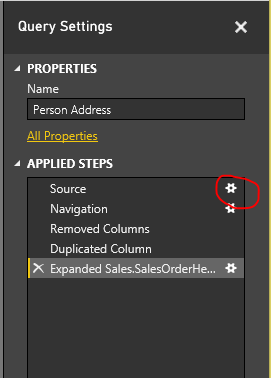
You can switch the query's source by editing its source step
Similarily, you can change the database by double clicking on the Navigation step.
Regards,
PQ
2 Replies
 BjoernContinued Contributor
Please go to the Power BI desktop application, open the query part and click on "Advanced Editor" within a query.
You should be able to see something like this:
let
Source = Sql.Databases("YOURSERVERNAME.database.windows.net"),
YOURSERVERNAME= Source{[Name="YOURDATABASENAME"]}[Data],
Schema_TableName = YOURDATABASENAME{[Schema="scheme",Item="TableName"]}[Data]
in
Schema_TableNameCould you please share this? Try to replace the strings with the new servername.
 pmousecaRegular Visitor
Hi Amerilin,
Once you build a connection (aka "Query"), you can go to the queries editor by hitting the "Edit Queries" button in the ribbon, then you'll see that query with a list of operations that you did.
You can switch the query's source by editing its source step
Similarily, you can change the database by double clicking on the Navigation step.
Regards,
PQ