Forum Discussion

Change Sql Connection
 10 years ago
Hi Amerilin,
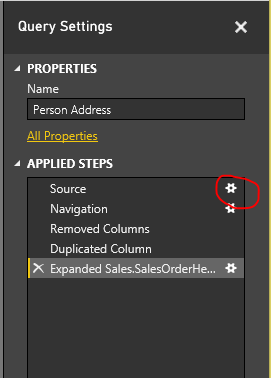
Once you build a connection (aka "Query"), you can go to the queries editor by hitting the "Edit Queries" button in the ribbon, then you'll see that query with a list of operations that you did.
You can switch the query's source by editing its source step
Similarily, you can change the database by double clicking on the Navigation step.
Regards,
PQ

Please go to the Power BI desktop application, open the query part and click on "Advanced Editor" within a query.
You should be able to see something like this:
let
Source = Sql.Databases("YOURSERVERNAME.database.windows.net"),
YOURSERVERNAME= Source{[Name="YOURDATABASENAME"]}[Data],
Schema_TableName = YOURDATABASENAME{[Schema="scheme",Item="TableName"]}[Data]
in
Schema_TableName
Could you please share this? Try to replace the strings with the new servername.