cancel
Showing results for 
Search instead for 
Did you mean: 

July 7 - July 17 | Round 2 of the Power BI Dataviz World Championships. Don't miss your chance! Learn more

Reply
Anonymous
Not applicable

Change SQL-connection from Windows to SQL

In a pbix-file I'v made different connections to a sql-dataserver.

In the development-fase I'v made the error to connect by using my windows-account. How can i redefine this connection for using a sql-account.

I don't see this information in the advanced queries with the definition of the connection. (I see servername, table name or sql-instruction, but no login-info).


1 ACCEPTED SOLUTION
Eric_Zhang
Microsoft Employee
Microsoft Employee

2 REPLIES 2
Eric_Zhang
Microsoft Employee
Microsoft Employee

Check

Capture.PNG

Greg_Deckler
Community Champion
Community Champion

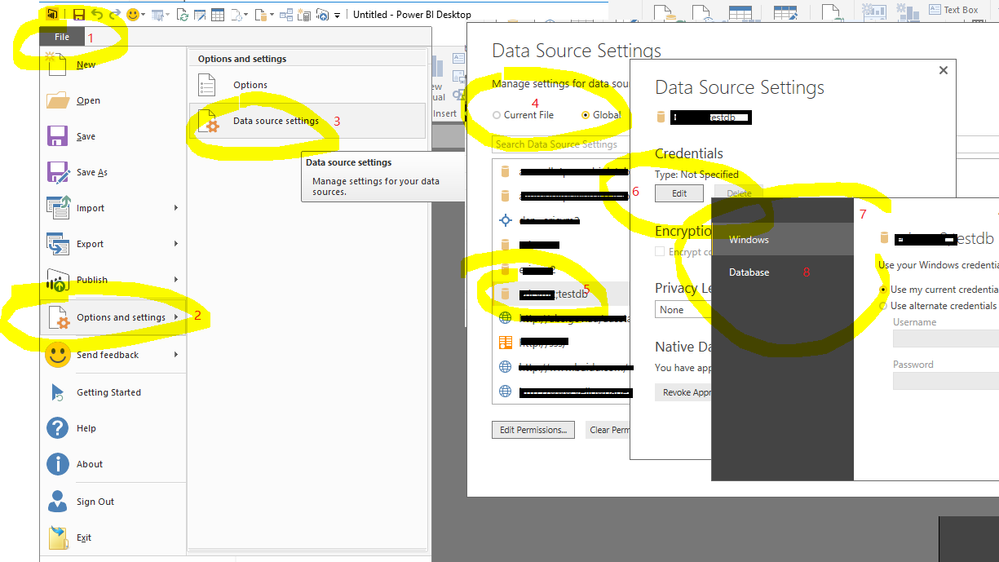
Try going to File | Options and settings | Data source settings. Double click your SQL server connection and you should be able to edit the credentials.


Follow on LinkedIn
@ me in replies or I'll lose your thread!!!
Instead of a Kudo, please vote for this idea
Become an expert!: Enterprise DNA
External Tools: MSHGQM
YouTube Channel!: Microsoft Hates Greg
Latest book!:
DAX For Humans

DAX is easy, CALCULATE makes DAX hard...

Helpful resources

Announcements
FabCon and SQLCon Barcelona 2026

FabCon & SQLCon – Barcelona 2026

Join us in Barcelona for FabCon and SQLCon, the Fabric, Power BI, SQL, and AI community event. Save €200 with code FABCMTY200.

60 days of Data Days Carousel

Data Days 2026

Join Fabric Data Days 2026: 60 days of free live/on-demand sessions, challenges, study groups, and certification opportunities.

Power BI DataViz World Championships carousel

Power BI DataViz World Championships - June 2026

A new Power BI DataViz World Championship is coming this June! Don't miss out on submitting your entry.